© 2026 ankushak.
© 2026 ankushak.
© 2026 ankushak.
Contents
0%
Netwise
Netwise
Netwise
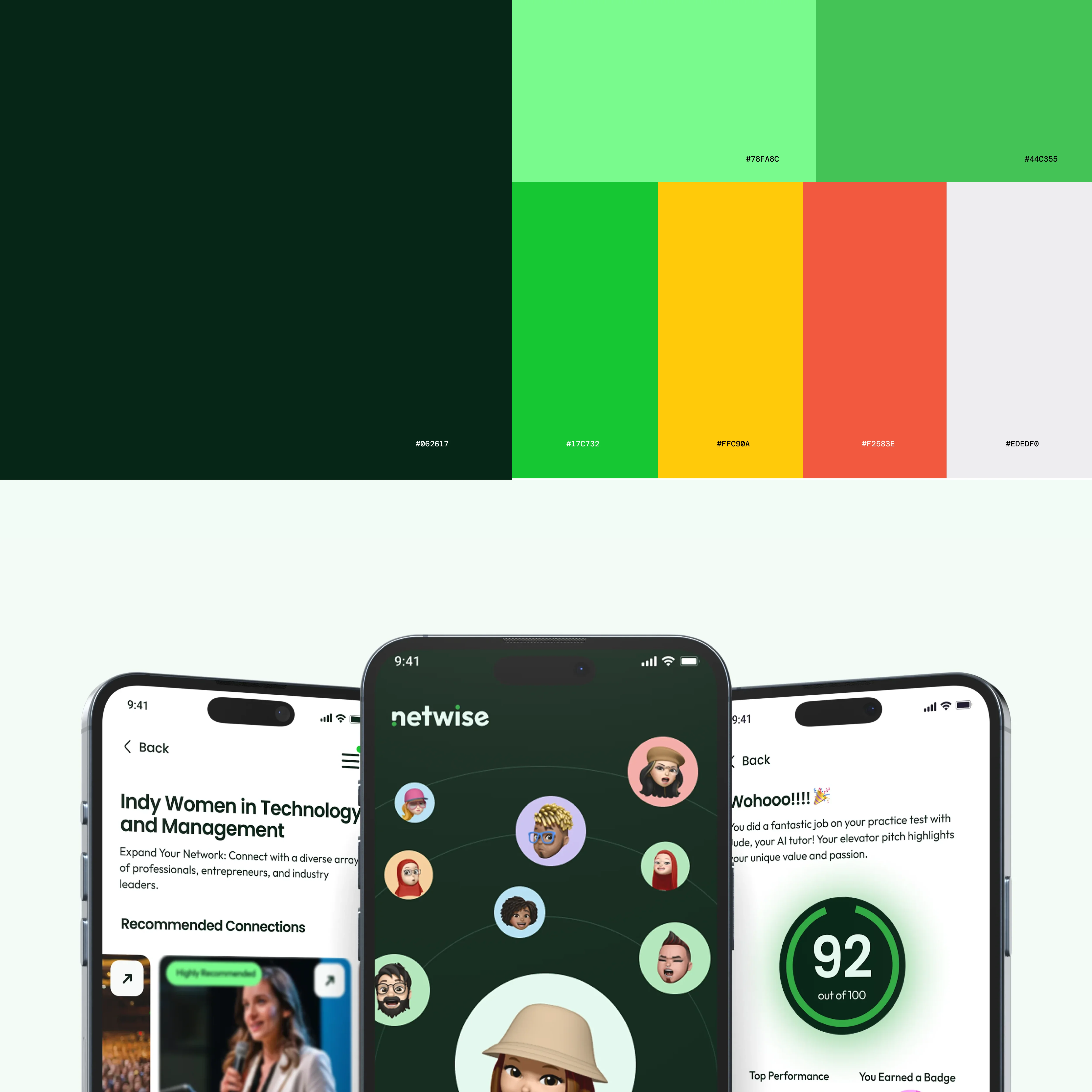
Netwise is your smart networking wingman, helping you feel prepared, confident, and connected. With AI coaching, real-time feedback, and event insights, it tackles anxiety, awkward intros, and forgettable follow-ups, transforming how you build relationships.
Netwise is your smart networking wingman, helping you feel prepared, confident, and connected. With AI coaching, real-time feedback, and event insights, it tackles anxiety, awkward intros, and forgettable follow-ups, transforming how you build relationships.
Client
Resource & Supply
Project Status
Currently in Development
Industry
/ Mobile App / EdTech / Professional Networking
Timeline
2 Months
2 Months
Team
1 Product Designer, 1 UX Researchers, 3 Developer
1 Product Designer, 1 UX Researchers, 3 Developer
My Role
As a product designer, I led end‑to‑end design from user research (interviews, surveys, competitive analysis) to personas, design systems, prototyping, and usability testing to shape and refine product experiences.
As a product designer, I led end‑to‑end design from user research (interviews, surveys, competitive analysis) to personas, design systems, prototyping, and usability testing to shape and refine product experiences.
The Problem
The Problem
The Problem
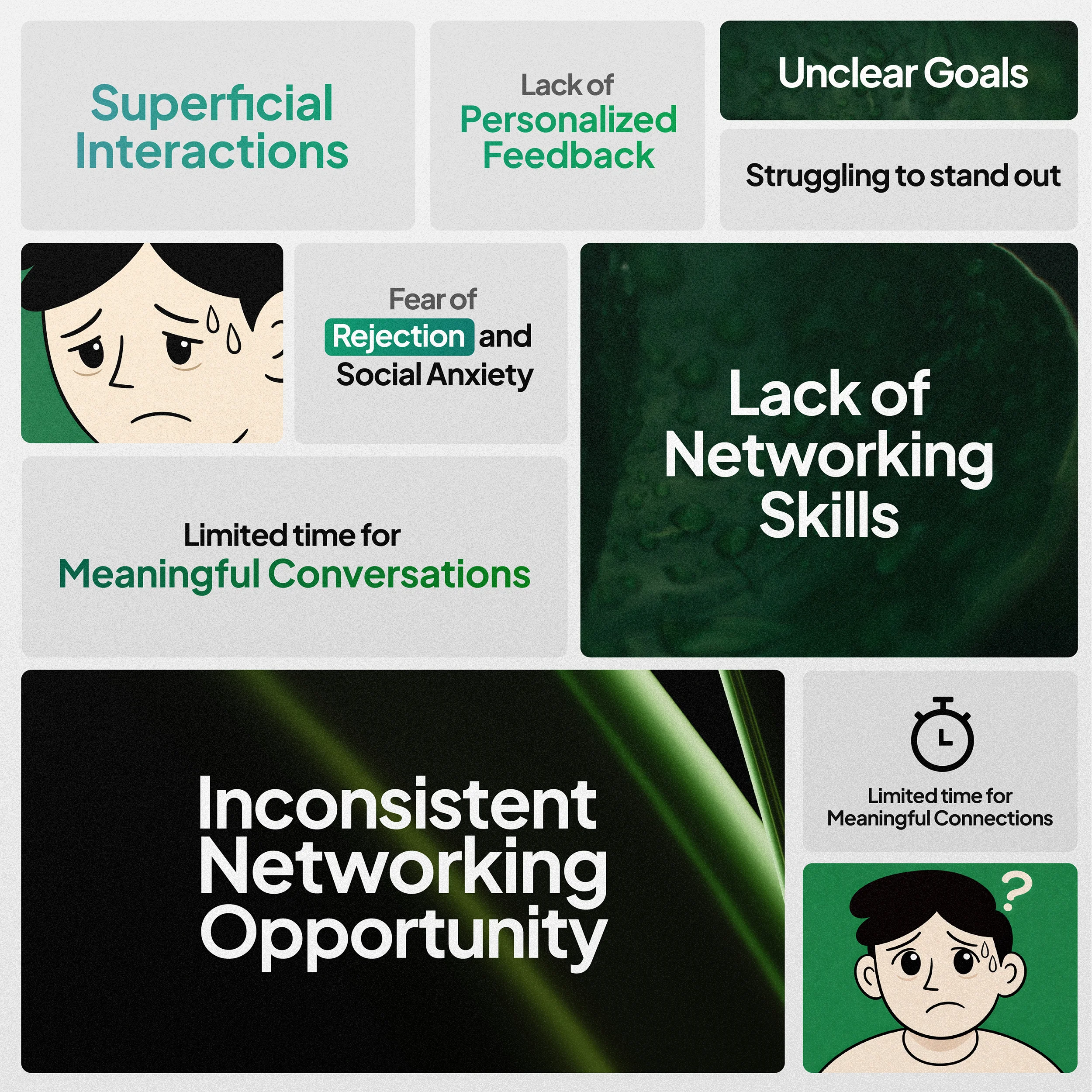
Users face challenges in building confidence, mastering networking conversations, preparing for events in uncertain situations, and sustaining meaningful professional connections.
Users face challenges in building confidence, mastering networking conversations, preparing for events in uncertain situations, and sustaining meaningful professional connections.
Mastering Networking Conversations Effectively: Professionals often struggle to start and sustain engaging conversations, limiting success.
Networking Event Preparation & Sustaining Connections: Professionals struggle to identify key connections, strategize for events, and follow up, limiting long-term opportunities.
Mastering Networking Conversations Effectively: Professionals often struggle to start and sustain engaging conversations, limiting success.
Networking Event Preparation & Sustaining Connections: Professionals struggle to identify key connections, strategize for events, and follow up, limiting long-term opportunities.
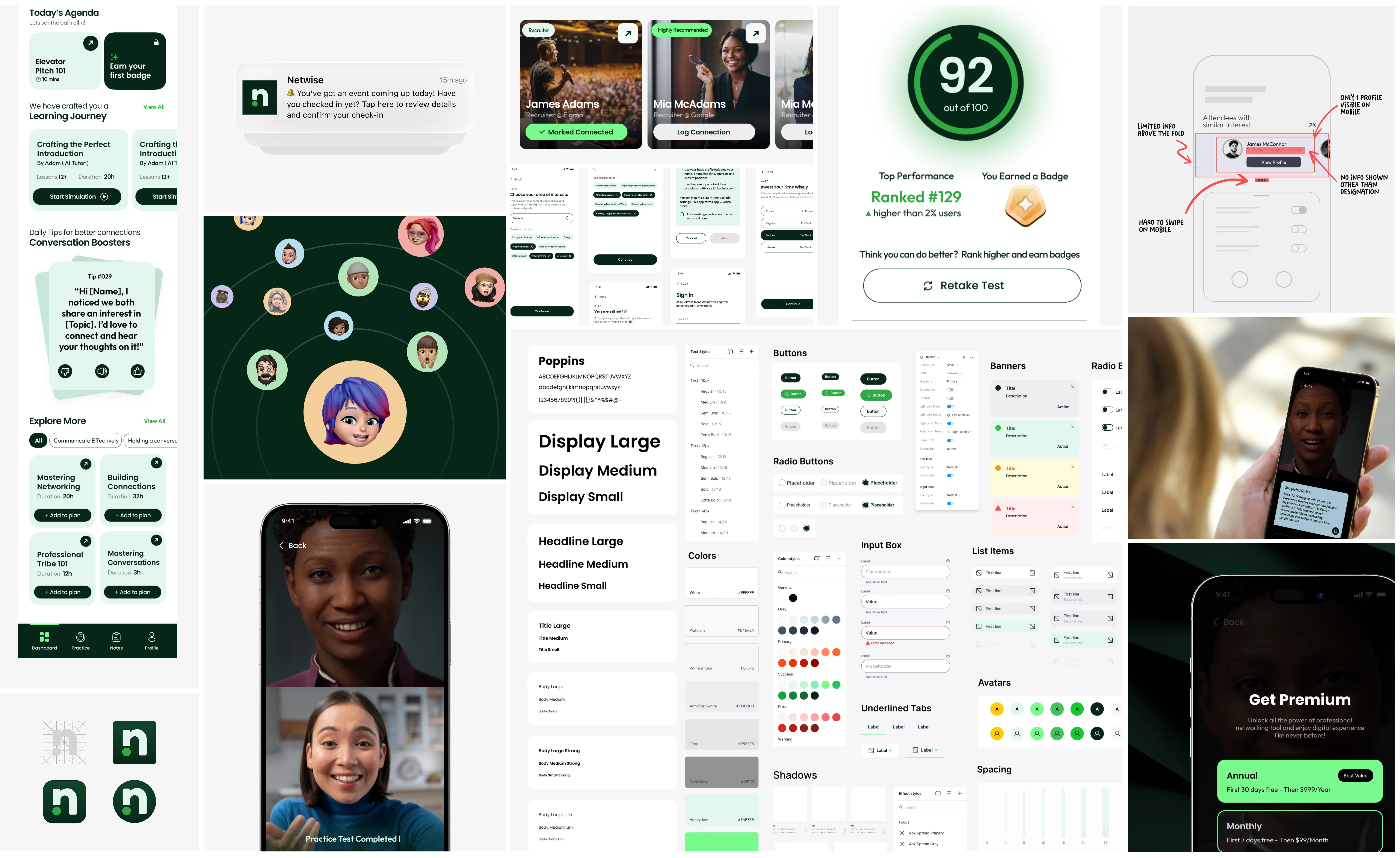
Note: I identified two key pain points by analyzing data from user interviews, surveys, personas, and user flows.
Result
Metric
Impact
Result
Brand recognition
71%
Strong early awareness for a newly launched brand in its target market
Brand recognition
71%
Brand recognition
71%
Strong early awareness for a newly launched brand in its target market
Customer trust score
8.9 / 10
Reflects positive perception of quality, reliability, and consistency
Customer trust score
8.9 / 10
Customer trust score
8.9 / 10
Reflects positive perception of quality, reliability, and consistency
Digital engagement
+58%
Social interactions and community growth show strong resonance
Digital engagement
+58%
Digital engagement
+58%
Social interactions and community growth show strong resonance
Accessibility
100% (WCAG 2.1 AA)
Ensures inclusivity and broad accessibility across digital platforms
Accessibility
100% (WCAG 2.1 AA)
Accessibility
100% (WCAG 2.1 AA)
Ensures inclusivity and broad accessibility across digital platforms
Social engagement
+58%
Higher interaction with brand content.
Social engagement
+58%
Social engagement
+58%
Higher interaction with brand content.
Brand consistency score
90%
Unified system across touchpoints.
Brand consistency score
90%
Brand consistency score
90%
Unified system across touchpoints.
Discovery Sprint
Discovery Sprint
Discovery Sprint
A deep dive into understanding users, defining the real challenge, and opening up space for the right ideas.
A deep dive into understanding users, defining the real challenge, and opening up space for the right ideas.
In this discovery sprint, I mapped the problem space through user research, interviews, and competitive analysis to uncover what was truly getting in people’s way. I then synthesized those findings into clear problem statements and experience goals that could guide every design decision. Finally, I explored multiple directions through ideation workshops, sketches, and early concepts, narrowing in on the most promising solutions to prototype and test.
Interviews
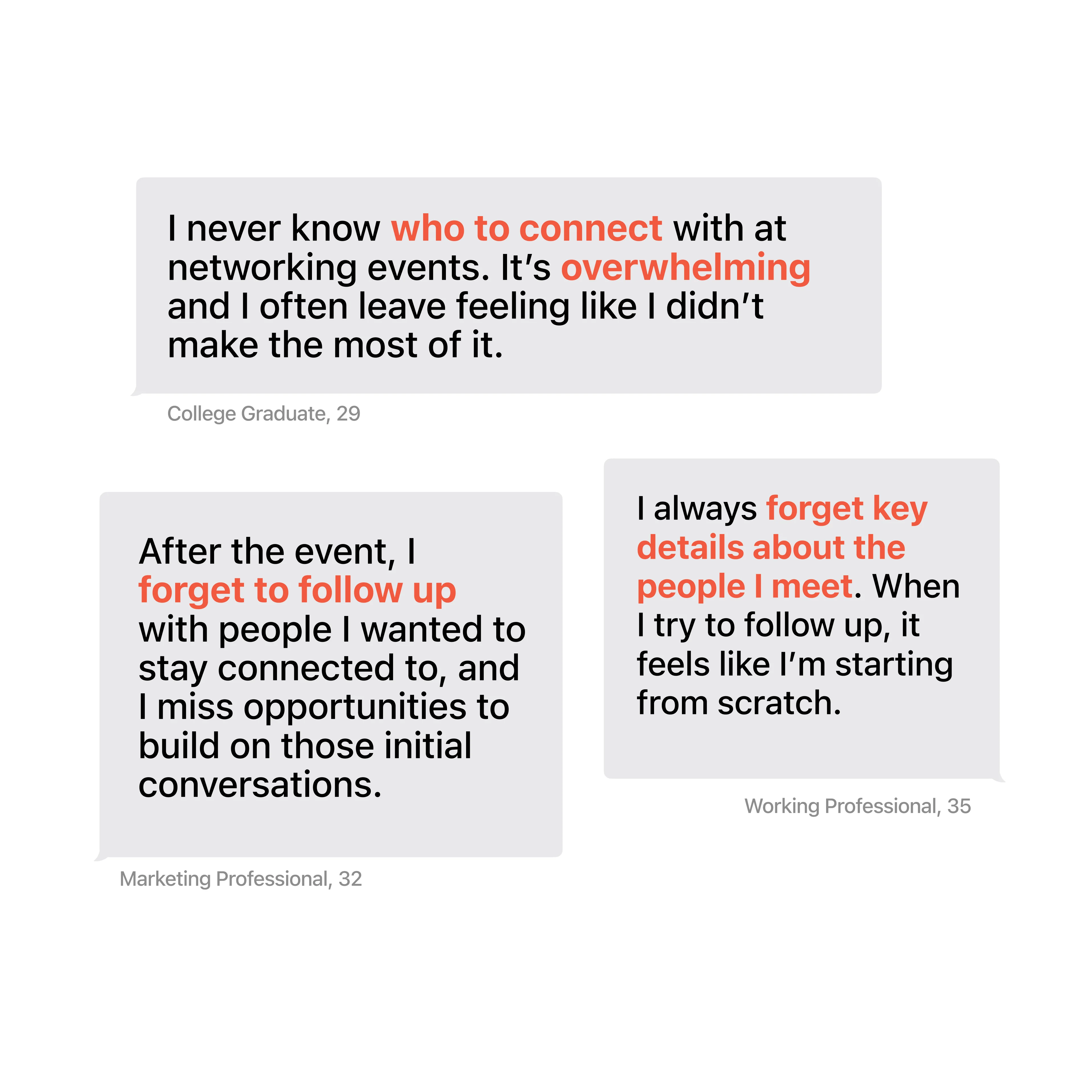
To deeply understand how students and professionals experience networking, I helped conduct 30 interviews and synthesized recurring themes around anxiety, conversation flow, and follow-up challenges into clear opportunity areas for Netwise. Talking directly to people helped me get past assumptions and uncover the real emotions behind networking, such as awkward starts, nerves, and follow-up guilt that never show up in analytics. I crafted the interview script, led nine of the sessions myself, and turned raw quotes into actionable design directions that grounded every core feature in lived experience.
Surveys
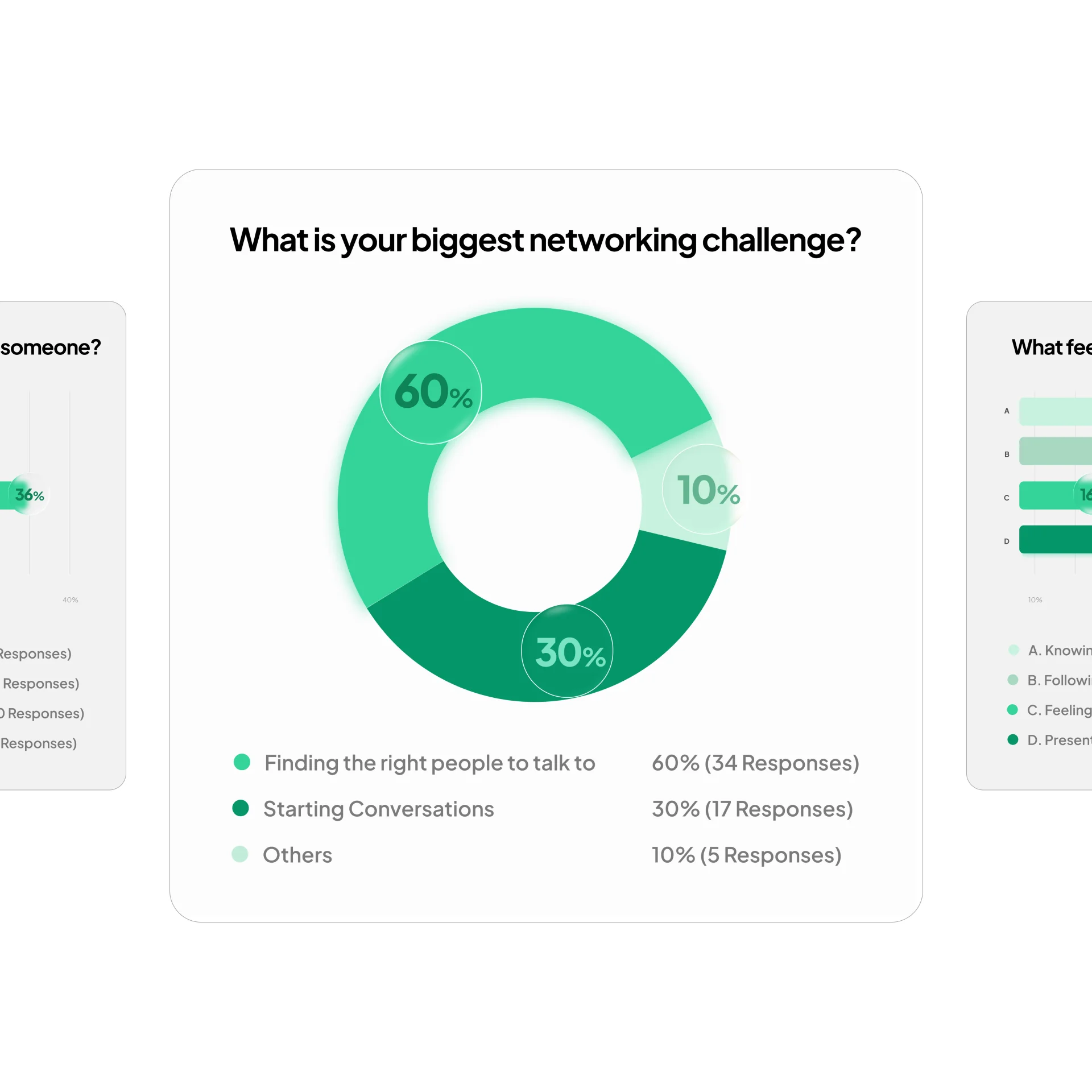
To understand how widespread the biggest networking pain points were, I ran surveys to measure issues like anxiety before events and difficulty following up afterward, and analyzed both quantitative trends and open-ended responses to prioritize what mattered most. As of Jan 24, 2025, we had 56 responses that revealed clear patterns across different user groups and turned vague frustrations into measurable problems we could act on. I designed the survey, crafted the questions, and synthesized the results into focused insights that grounded our product decisions in evidence rather than assumptions.
Storyboard
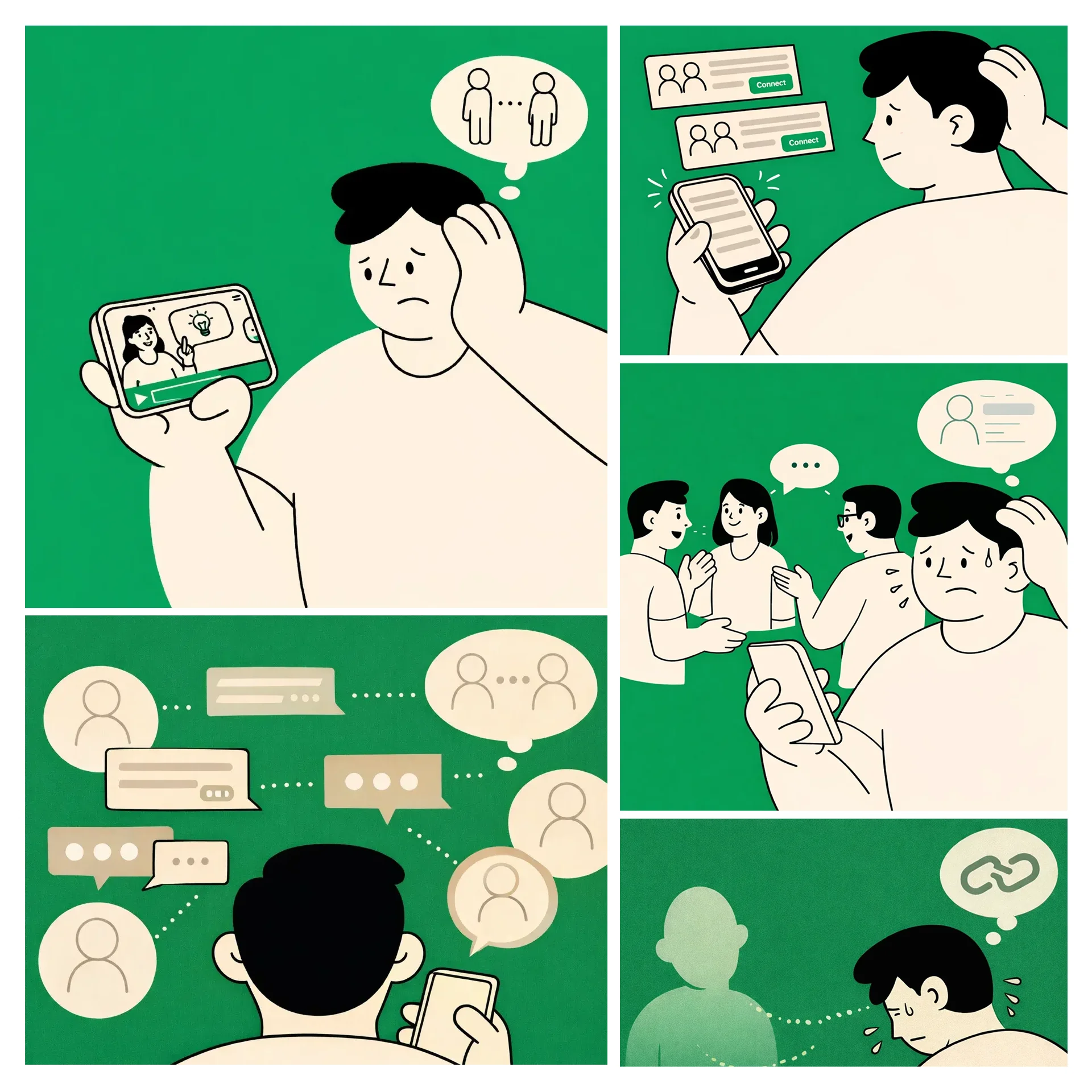
To bring the research to life, I turned the networking journey into a storyboard that followed users from watching generic tips to preparing for events, navigating crowded rooms, and eventually losing touch with new contacts. Mapping each step, along with its pain points and emotions, made the friction and missed opportunities impossible to ignore and clearly showed where Netwise needed to step in with guidance, structure, and smarter follow-ups.
Competitive Analysis
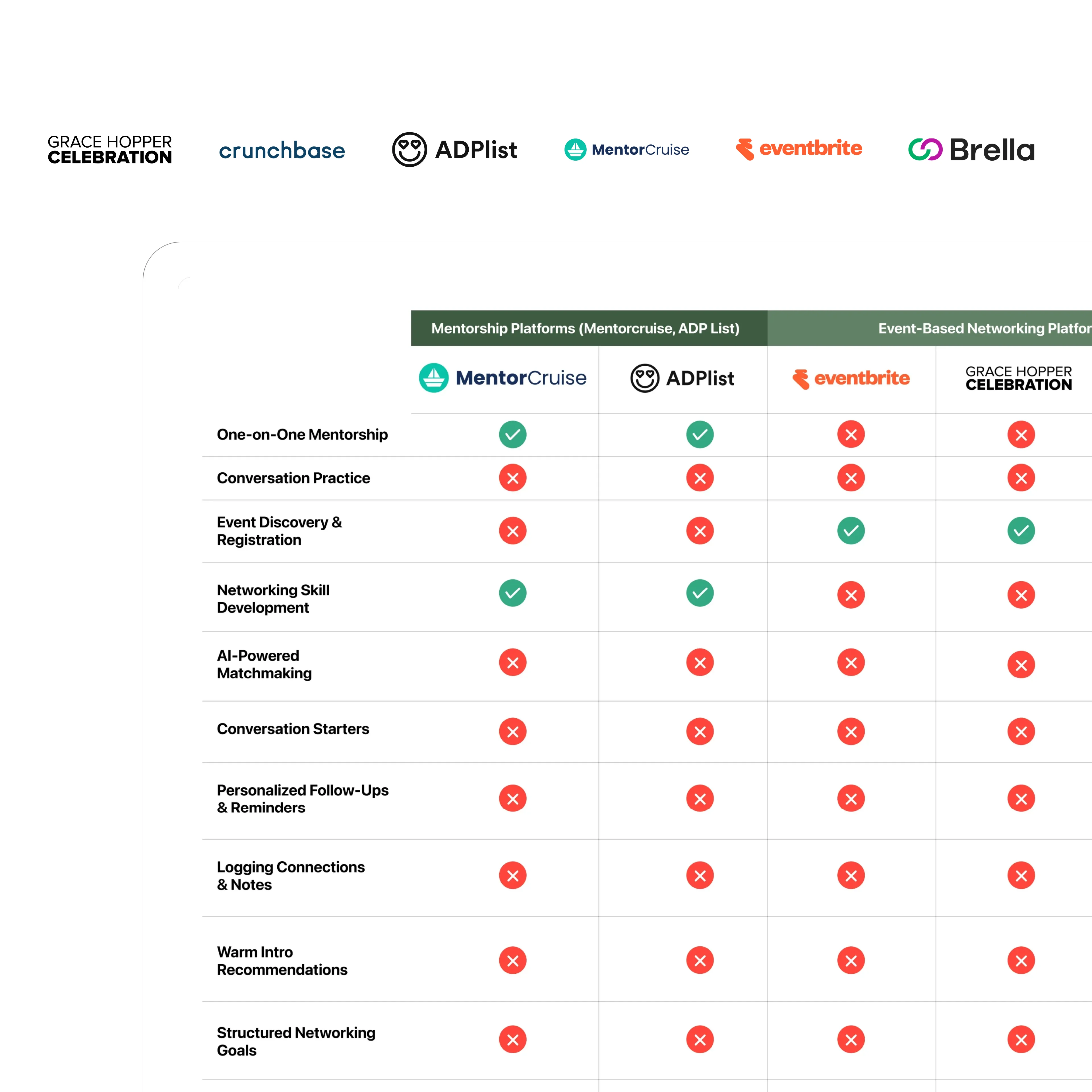
For competitive analysis, I audited existing mentorship and networking products to see how they handle things like event discovery, recommendations, and follow-ups, then mapped where they fell short for anxious or first-time networkers. Comparing flows, features, and positioning helped me spot clear gaps and opportunities, so Netwise could focus on differentiated value instead of just recreating what was already in the market.
Affinity Mapping
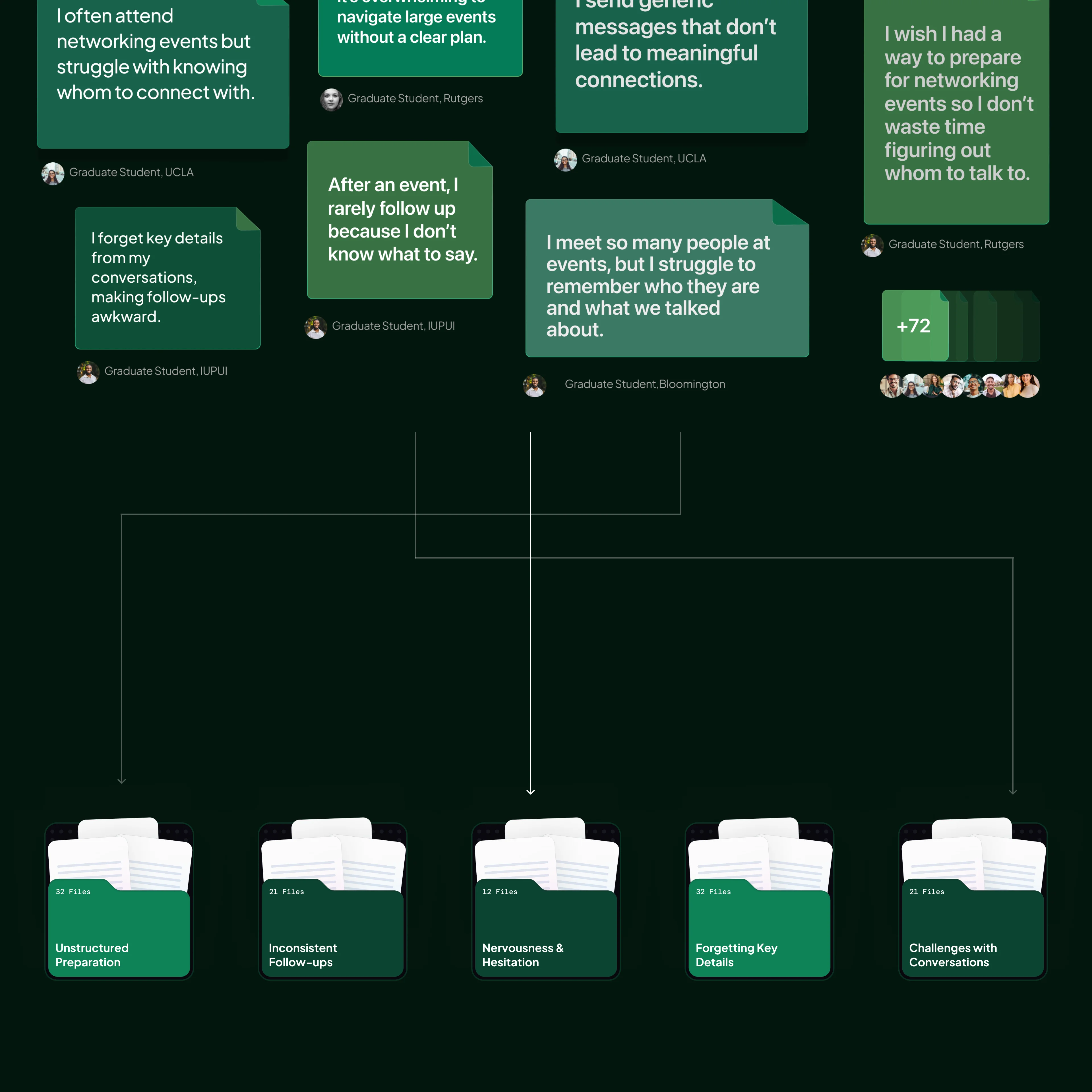
Affinity mapping helped me pull together everything we learned from interviews and surveys into one shared space, where raw quotes, observations, and data points were clustered into clear themes around confidence, event guidance, and follow-ups. By iterating on these clusters with the team, we turned scattered insights into a focused set of user needs and design priorities.
Personas
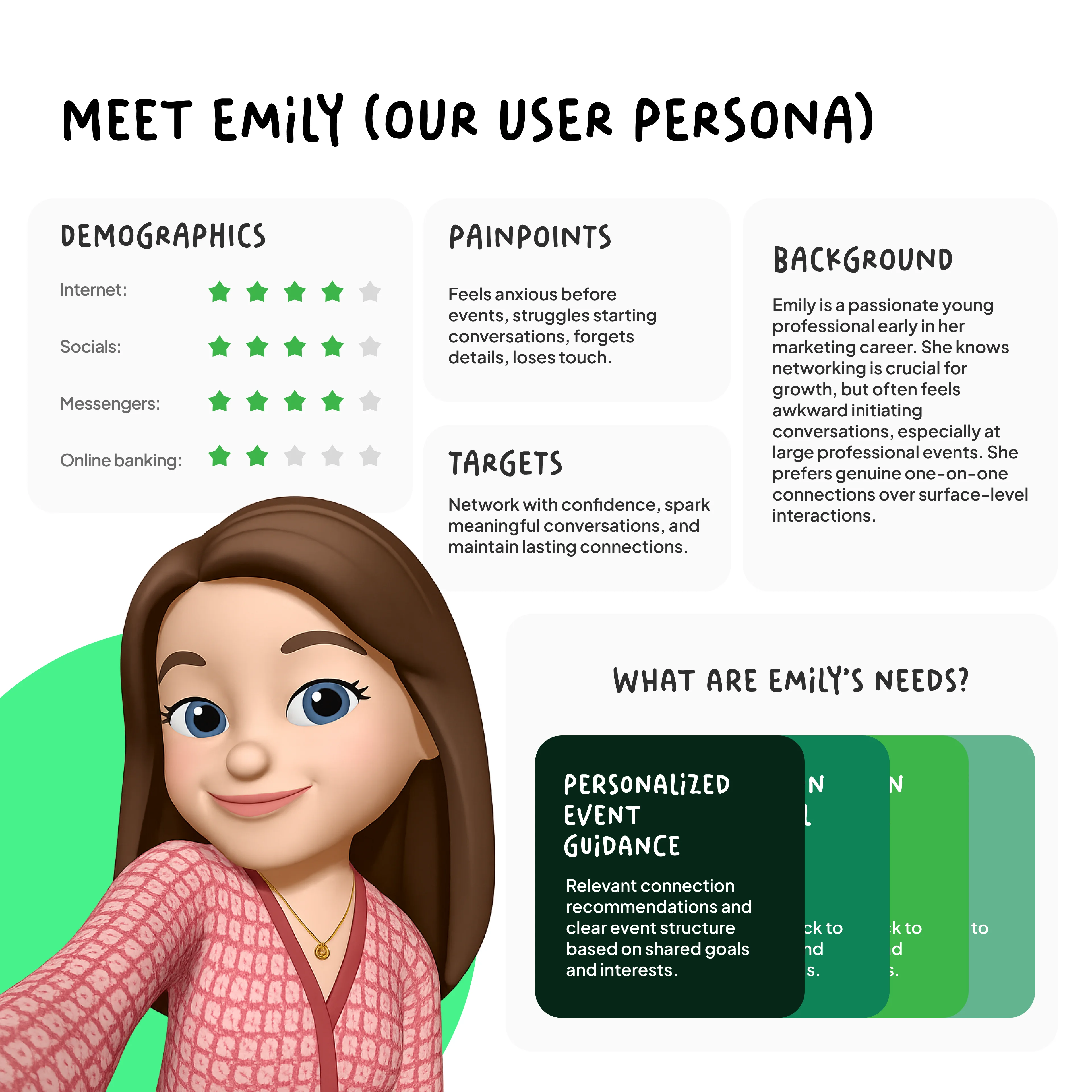
Personas turned our research into a clear picture of who we were designing for, distilled into Emily, a 22‑year‑old business student who wants to grow her network but feels nervous, overwhelmed, and unsure how to follow up. I led the process of translating interview and survey data into Emily’s goals, frustrations, and scenarios, then used her as a constant reference to judge ideas, prioritize features like AI practice and smart event guidance, and keep every design decision tied to real needs rather than a vague “user.”
Journey Mapping
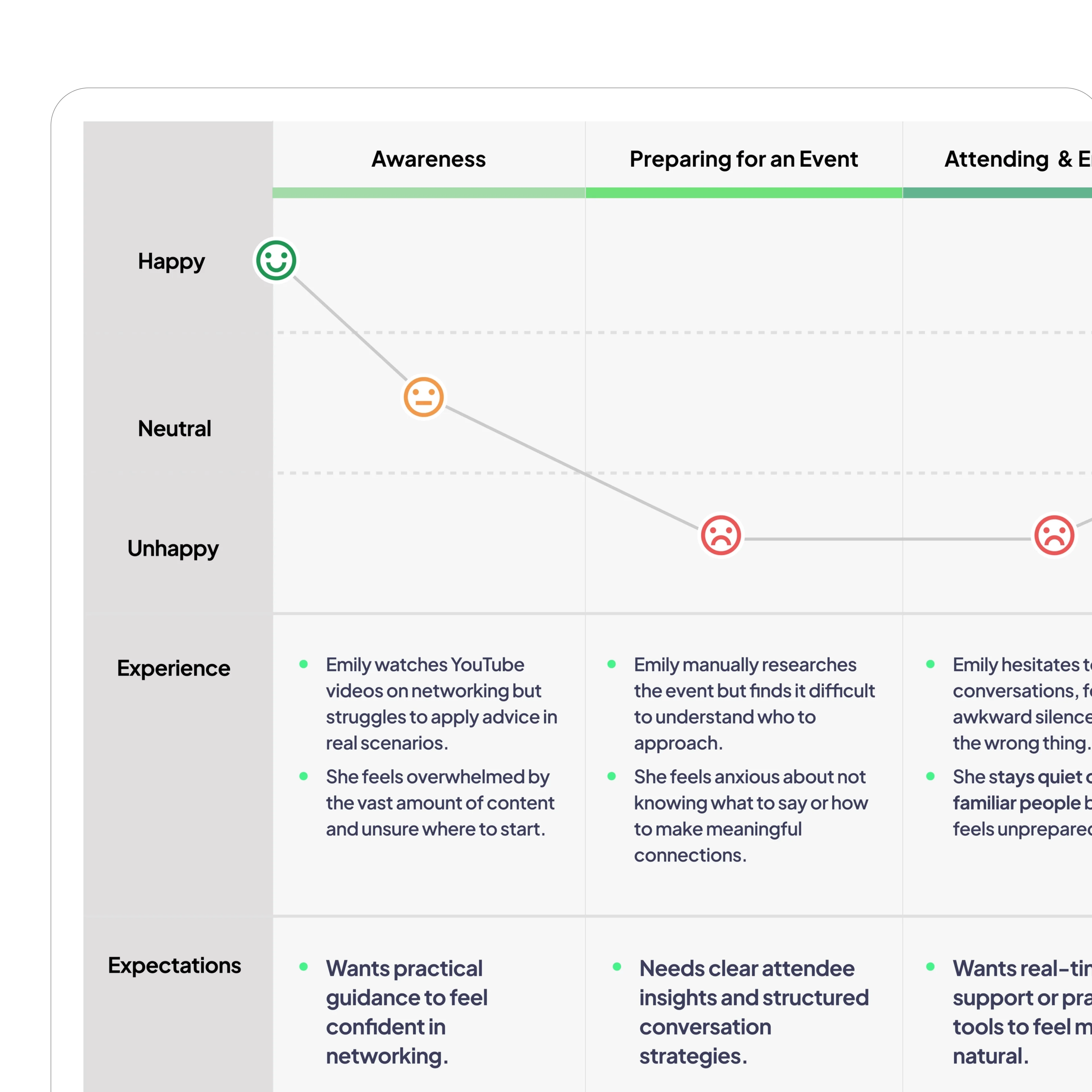
Journey mapping helped me connect all the research into a single, end‑to‑end view of Emily’s networking experience, from feeling nervous before an event to losing momentum afterward. I plotted her actions, thoughts, and emotions across each stage, then used that map to pinpoint where Netwise should intervene with features like AI practice, smarter recommendations, and structured follow-ups so we were solving problems at the right moments instead of in isolation.
Crazy 8s
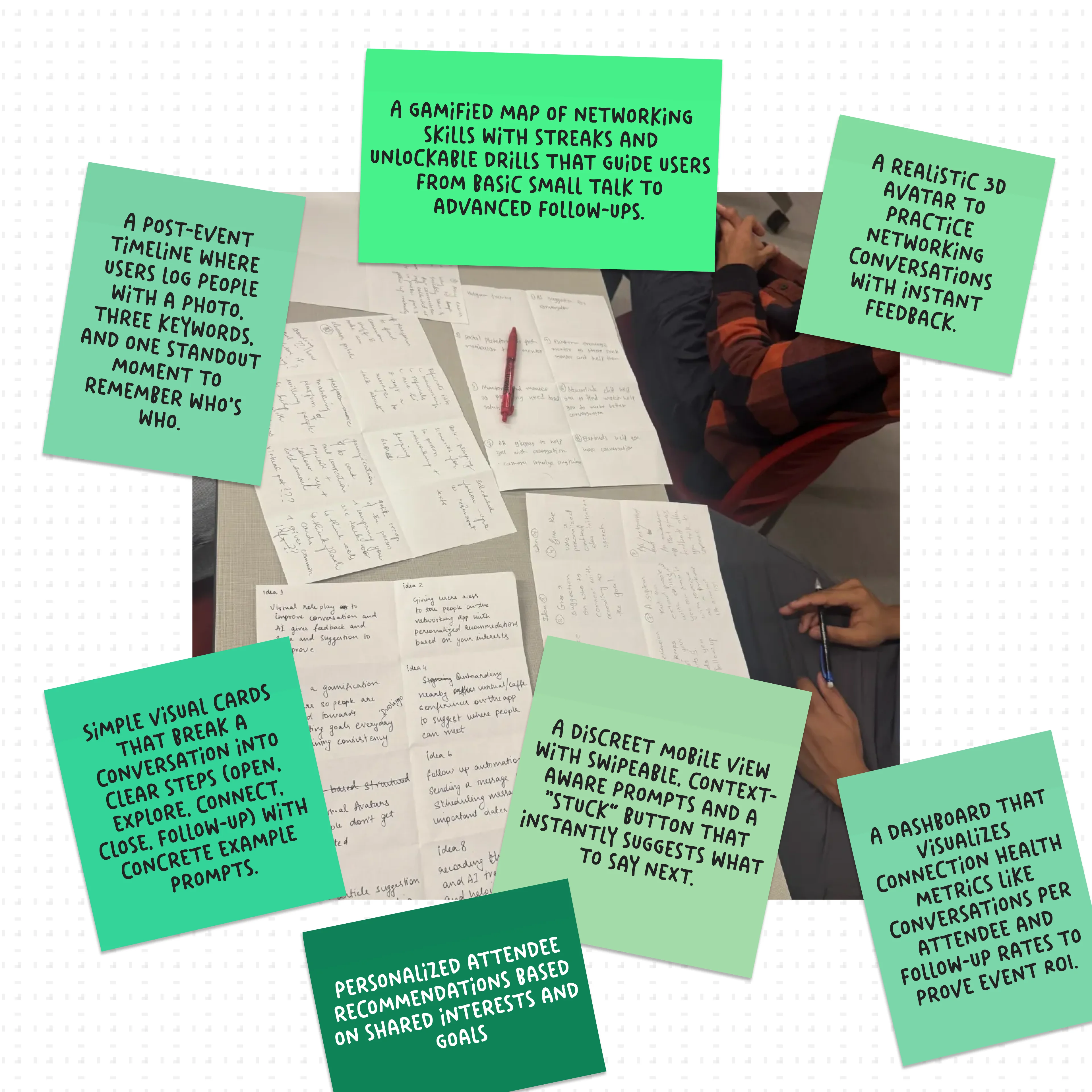
Crazy 8s gave us a fast way to turn all the research into potential directions by forcing me to write eight different ideas for the same networking problem in just eight minutes. I facilitated the exercise, generated my own set of ideas, and then clustered the strongest directions around practice, event guidance, and follow-ups so the team had a clear, research-backed starting point instead of jumping straight into random solutions.
MoSCoW Method
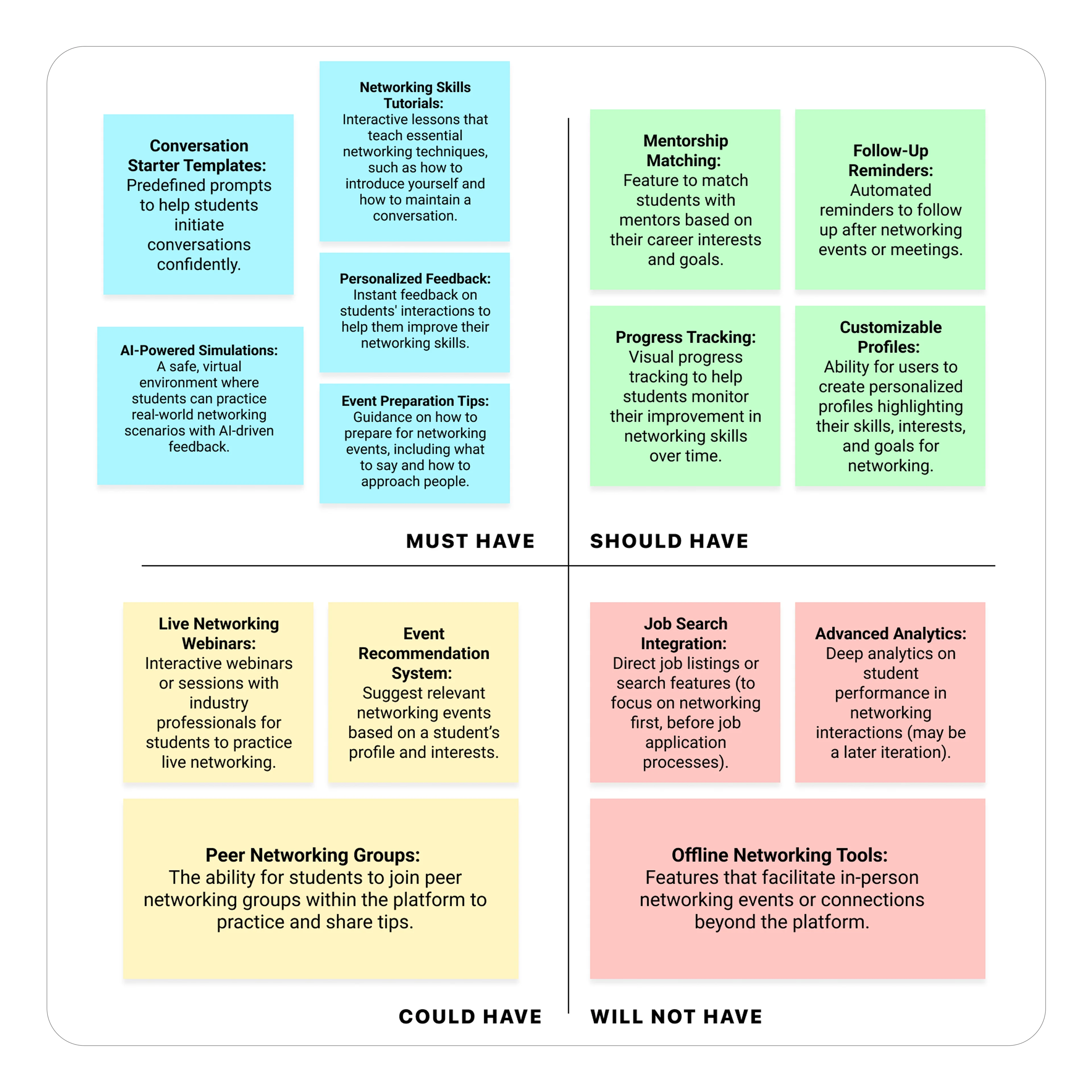
MoSCoW helped me turn all the brainstorming ideas into a prioritized roadmap by sorting features into Must-Have, Should-Have, Could-Have, and Won't-Have based on user needs and technical feasibility. I led the exercise, facilitated team discussions to align on what belonged in each category, and used that structure to define a focused MVP that addressed Emily's core pain points around practice, event guidance, and follow-ups without overloading the first version.
Information Architecture
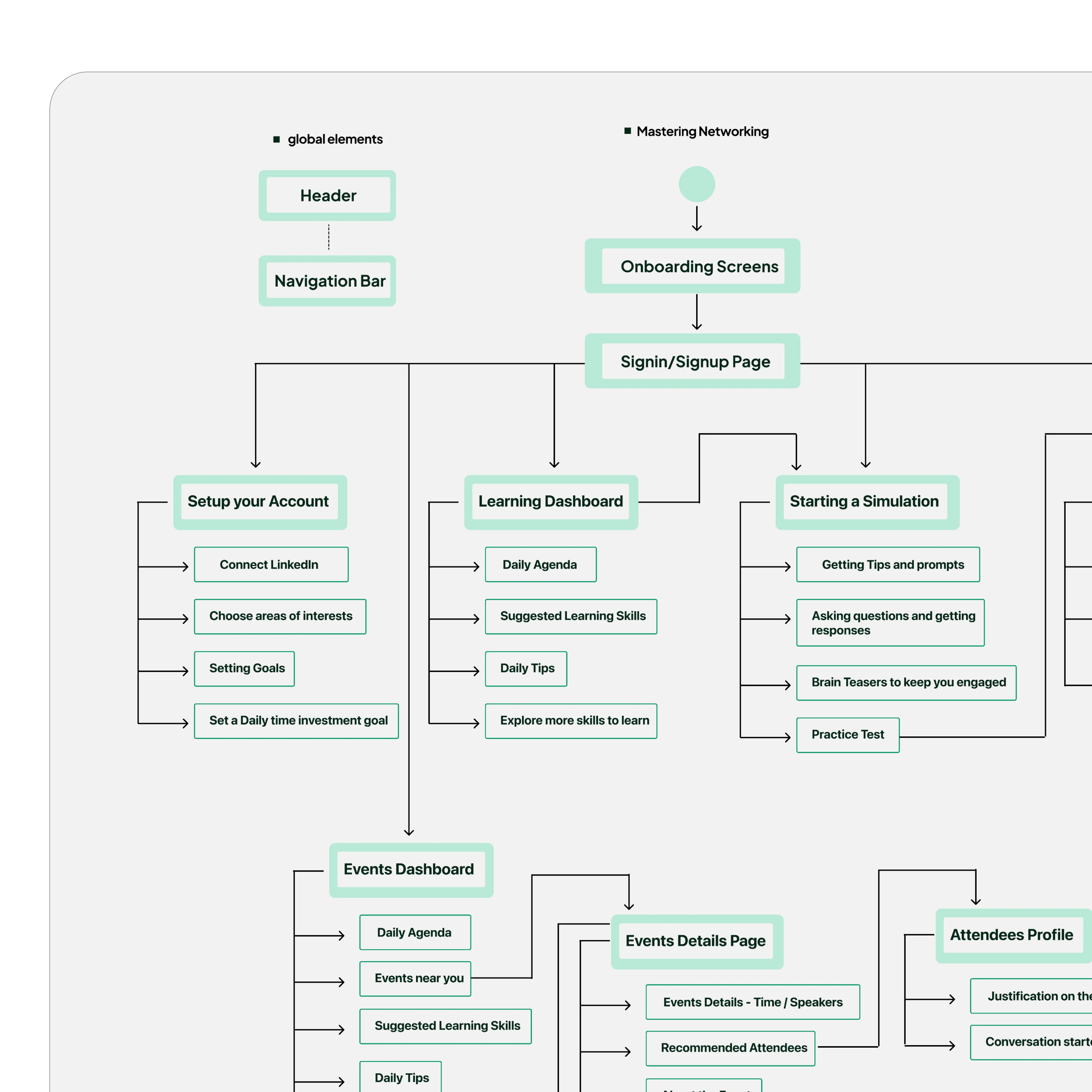
The information architecture turned all our prioritized features into a clear structure that showed how users would move from onboarding to practice mode, event discovery, and follow-ups across the entire Netwise experience. I mapped the hierarchy and relationships between sections like setup, learning, simulations, and events so the team could spot gaps in the flow, ensure nothing critical was buried, and design navigation that felt logical instead of overwhelming.
Interviews
To deeply understand how students and professionals experience networking, I helped conduct 30 interviews and synthesized recurring themes around anxiety, conversation flow, and follow-up challenges into clear opportunity areas for Netwise. Talking directly to people helped me get past assumptions and uncover the real emotions behind networking, such as awkward starts, nerves, and follow-up guilt that never show up in analytics. I crafted the interview script, led nine of the sessions myself, and turned raw quotes into actionable design directions that grounded every core feature in lived experience.
Surveys
To understand how widespread the biggest networking pain points were, I ran surveys to measure issues like anxiety before events and difficulty following up afterward, and analyzed both quantitative trends and open-ended responses to prioritize what mattered most. As of Jan 24, 2025, we had 56 responses that revealed clear patterns across different user groups and turned vague frustrations into measurable problems we could act on. I designed the survey, crafted the questions, and synthesized the results into focused insights that grounded our product decisions in evidence rather than assumptions.
Storyboard
To bring the research to life, I turned the networking journey into a storyboard that followed users from watching generic tips to preparing for events, navigating crowded rooms, and eventually losing touch with new contacts. Mapping each step, along with its pain points and emotions, made the friction and missed opportunities impossible to ignore and clearly showed where Netwise needed to step in with guidance, structure, and smarter follow-ups.
Competitive Analysis
For competitive analysis, I audited existing mentorship and networking products to see how they handle things like event discovery, recommendations, and follow-ups, then mapped where they fell short for anxious or first-time networkers. Comparing flows, features, and positioning helped me spot clear gaps and opportunities, so Netwise could focus on differentiated value instead of just recreating what was already in the market.
Affinity Mapping
Affinity mapping helped me pull together everything we learned from interviews and surveys into one shared space, where raw quotes, observations, and data points were clustered into clear themes around confidence, event guidance, and follow-ups. By iterating on these clusters with the team, we turned scattered insights into a focused set of user needs and design priorities.
Personas
Personas turned our research into a clear picture of who we were designing for, distilled into Emily, a 22‑year‑old business student who wants to grow her network but feels nervous, overwhelmed, and unsure how to follow up. I led the process of translating interview and survey data into Emily’s goals, frustrations, and scenarios, then used her as a constant reference to judge ideas, prioritize features like AI practice and smart event guidance, and keep every design decision tied to real needs rather than a vague “user.”
Journey Mapping
Journey mapping helped me connect all the research into a single, end‑to‑end view of Emily’s networking experience, from feeling nervous before an event to losing momentum afterward. I plotted her actions, thoughts, and emotions across each stage, then used that map to pinpoint where Netwise should intervene with features like AI practice, smarter recommendations, and structured follow-ups so we were solving problems at the right moments instead of in isolation.
Crazy 8s
Crazy 8s gave us a fast way to turn all the research into potential directions by forcing me to write eight different ideas for the same networking problem in just eight minutes. I facilitated the exercise, generated my own set of ideas, and then clustered the strongest directions around practice, event guidance, and follow-ups so the team had a clear, research-backed starting point instead of jumping straight into random solutions.
MoSCoW Method
MoSCoW helped me turn all the brainstorming ideas into a prioritized roadmap by sorting features into Must-Have, Should-Have, Could-Have, and Won't-Have based on user needs and technical feasibility. I led the exercise, facilitated team discussions to align on what belonged in each category, and used that structure to define a focused MVP that addressed Emily's core pain points around practice, event guidance, and follow-ups without overloading the first version.
Information Architecture
The information architecture turned all our prioritized features into a clear structure that showed how users would move from onboarding to practice mode, event discovery, and follow-ups across the entire Netwise experience. I mapped the hierarchy and relationships between sections like setup, learning, simulations, and events so the team could spot gaps in the flow, ensure nothing critical was buried, and design navigation that felt logical instead of overwhelming.
Interviews
To deeply understand how students and professionals experience networking, I helped conduct 30 interviews and synthesized recurring themes around anxiety, conversation flow, and follow-up challenges into clear opportunity areas for Netwise. Talking directly to people helped me get past assumptions and uncover the real emotions behind networking, such as awkward starts, nerves, and follow-up guilt that never show up in analytics. I crafted the interview script, led nine of the sessions myself, and turned raw quotes into actionable design directions that grounded every core feature in lived experience.
Surveys
To understand how widespread the biggest networking pain points were, I ran surveys to measure issues like anxiety before events and difficulty following up afterward, and analyzed both quantitative trends and open-ended responses to prioritize what mattered most. As of Jan 24, 2025, we had 56 responses that revealed clear patterns across different user groups and turned vague frustrations into measurable problems we could act on. I designed the survey, crafted the questions, and synthesized the results into focused insights that grounded our product decisions in evidence rather than assumptions.
Storyboard
To bring the research to life, I turned the networking journey into a storyboard that followed users from watching generic tips to preparing for events, navigating crowded rooms, and eventually losing touch with new contacts. Mapping each step, along with its pain points and emotions, made the friction and missed opportunities impossible to ignore and clearly showed where Netwise needed to step in with guidance, structure, and smarter follow-ups.
Competitive Analysis
For competitive analysis, I audited existing mentorship and networking products to see how they handle things like event discovery, recommendations, and follow-ups, then mapped where they fell short for anxious or first-time networkers. Comparing flows, features, and positioning helped me spot clear gaps and opportunities, so Netwise could focus on differentiated value instead of just recreating what was already in the market.
Affinity Mapping
Affinity mapping helped me pull together everything we learned from interviews and surveys into one shared space, where raw quotes, observations, and data points were clustered into clear themes around confidence, event guidance, and follow-ups. By iterating on these clusters with the team, we turned scattered insights into a focused set of user needs and design priorities.
Personas
Personas turned our research into a clear picture of who we were designing for, distilled into Emily, a 22‑year‑old business student who wants to grow her network but feels nervous, overwhelmed, and unsure how to follow up. I led the process of translating interview and survey data into Emily’s goals, frustrations, and scenarios, then used her as a constant reference to judge ideas, prioritize features like AI practice and smart event guidance, and keep every design decision tied to real needs rather than a vague “user.”
Journey Mapping
Journey mapping helped me connect all the research into a single, end‑to‑end view of Emily’s networking experience, from feeling nervous before an event to losing momentum afterward. I plotted her actions, thoughts, and emotions across each stage, then used that map to pinpoint where Netwise should intervene with features like AI practice, smarter recommendations, and structured follow-ups so we were solving problems at the right moments instead of in isolation.
Crazy 8s
Crazy 8s gave us a fast way to turn all the research into potential directions by forcing me to write eight different ideas for the same networking problem in just eight minutes. I facilitated the exercise, generated my own set of ideas, and then clustered the strongest directions around practice, event guidance, and follow-ups so the team had a clear, research-backed starting point instead of jumping straight into random solutions.
MoSCoW Method
MoSCoW helped me turn all the brainstorming ideas into a prioritized roadmap by sorting features into Must-Have, Should-Have, Could-Have, and Won't-Have based on user needs and technical feasibility. I led the exercise, facilitated team discussions to align on what belonged in each category, and used that structure to define a focused MVP that addressed Emily's core pain points around practice, event guidance, and follow-ups without overloading the first version.
Information Architecture
The information architecture turned all our prioritized features into a clear structure that showed how users would move from onboarding to practice mode, event discovery, and follow-ups across the entire Netwise experience. I mapped the hierarchy and relationships between sections like setup, learning, simulations, and events so the team could spot gaps in the flow, ensure nothing critical was buried, and design navigation that felt logical instead of overwhelming.
Findings
Findings
Findings
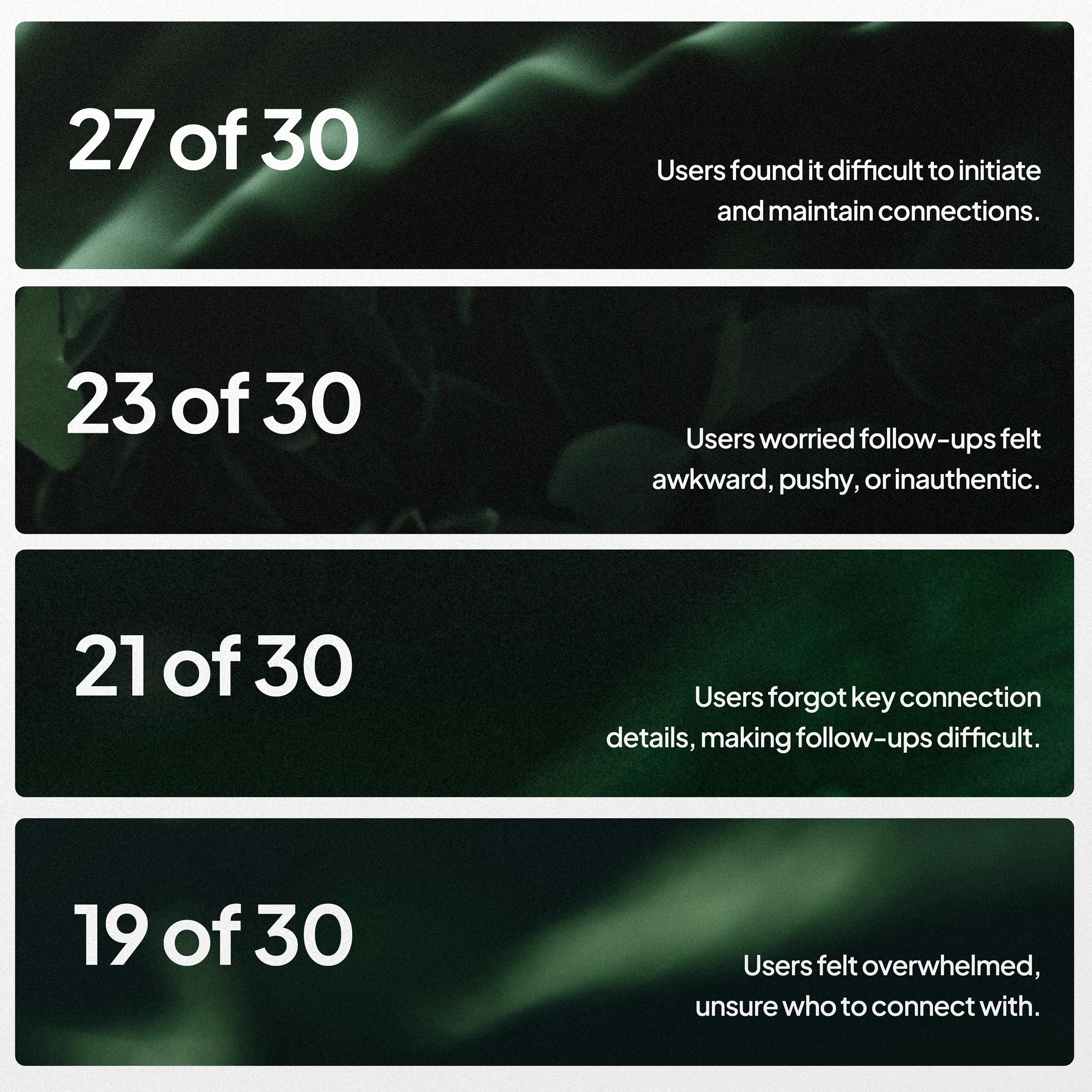
These findings reveal how consistently users struggle to turn casual encounters into meaningful, lasting connections. Instead of feeling empowered, most people experience networking as confusing, anxiety‑inducing, and hard to sustain over time.
These findings reveal how consistently users struggle to turn casual encounters into meaningful, lasting connections. Instead of feeling empowered, most people experience networking as confusing, anxiety‑inducing, and hard to sustain over time.
Many participants described feeling stuck between wanting to grow their network and not knowing what to say, when to reach out, or how to stand out without seeming inauthentic. Quantitatively, a large portion of users reported difficulty initiating and maintaining connections, forgetting key details, and feeling overwhelmed when deciding who to connect with next. Together, these findings point to a clear opportunity for a solution that structures the networking journey, reduces emotional friction, and makes it easier to build meaningful relationships over time.
Personalized Learning & Networking Dashboard
Boost your networking skills with a lifelike MetaHuman that helps you prep, practice, and perfect conversations with real-time feedback. Think of it as a low-pressure rehearsal room where you can try different intros, responses, and follow‑up questions before you ever walk into the actual event.
Personalizing the learning experience
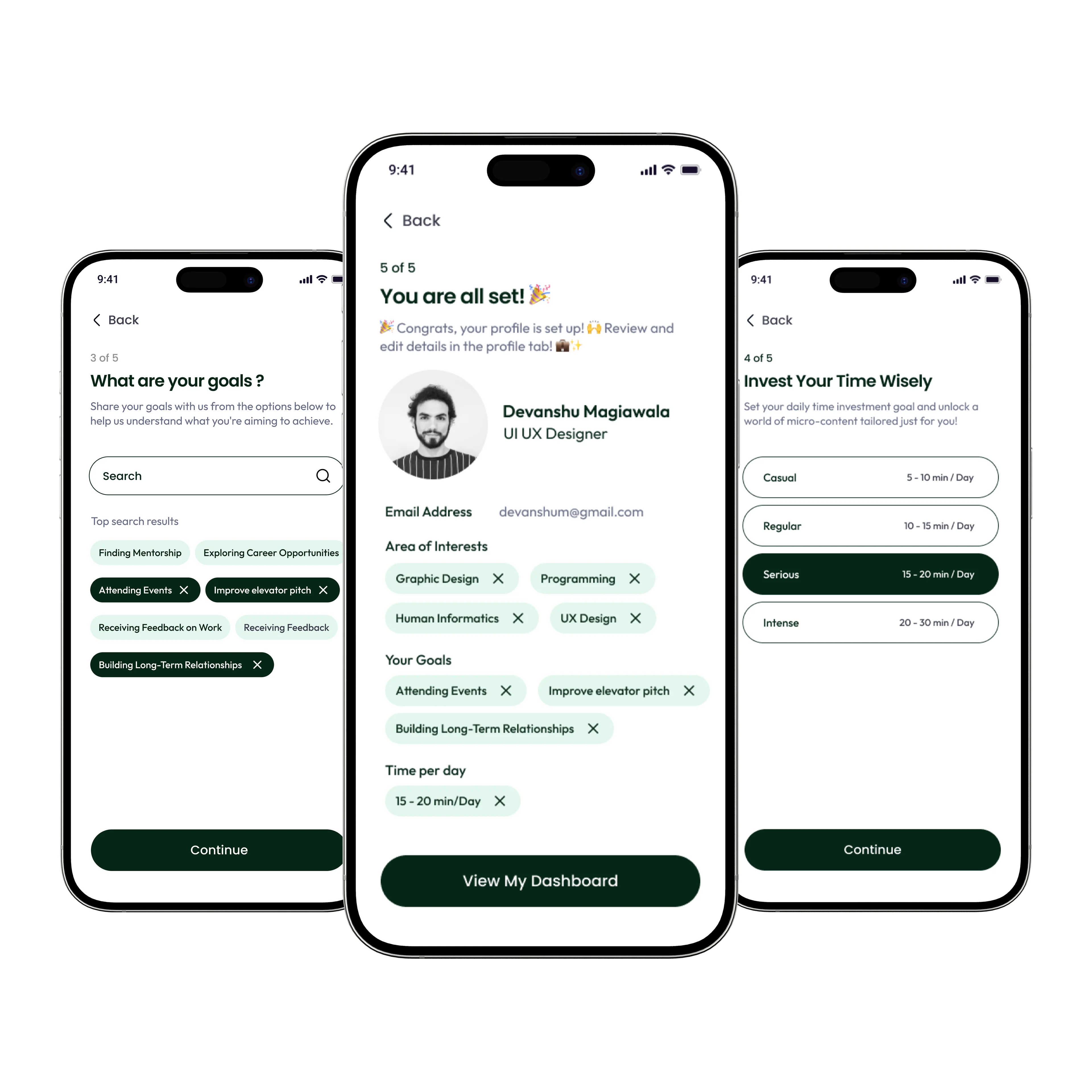
By setting clear goals and time limits, we made the learning journey focused, manageable, and tailored to participants' needs for greater impact.
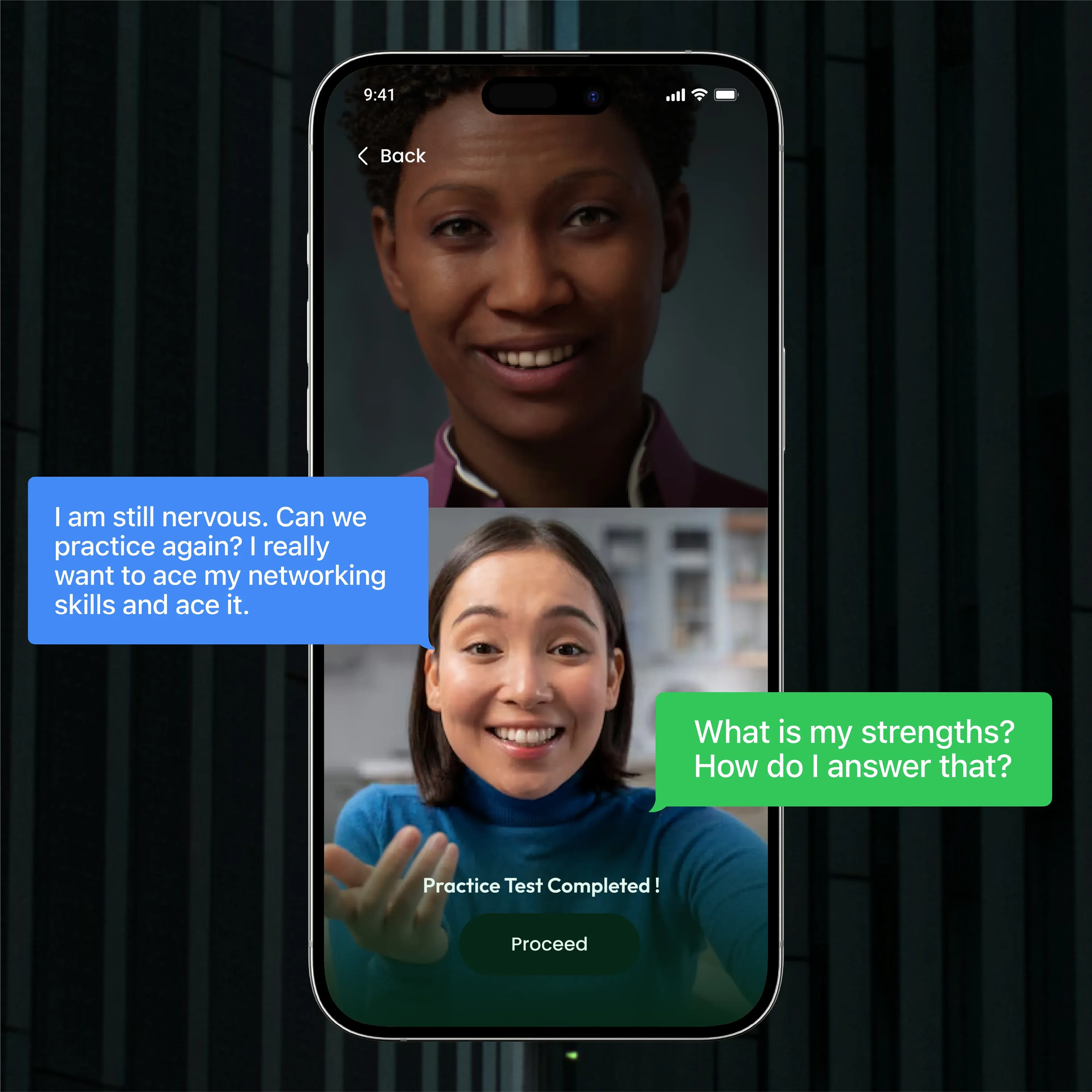
Test your skills with MetaHuman
Put your networking abilities to the test in a realistic, guided conversation, where you can safely practice answers to tough questions, replay scenarios when you feel nervous, and build confidence before you step into real-world events.
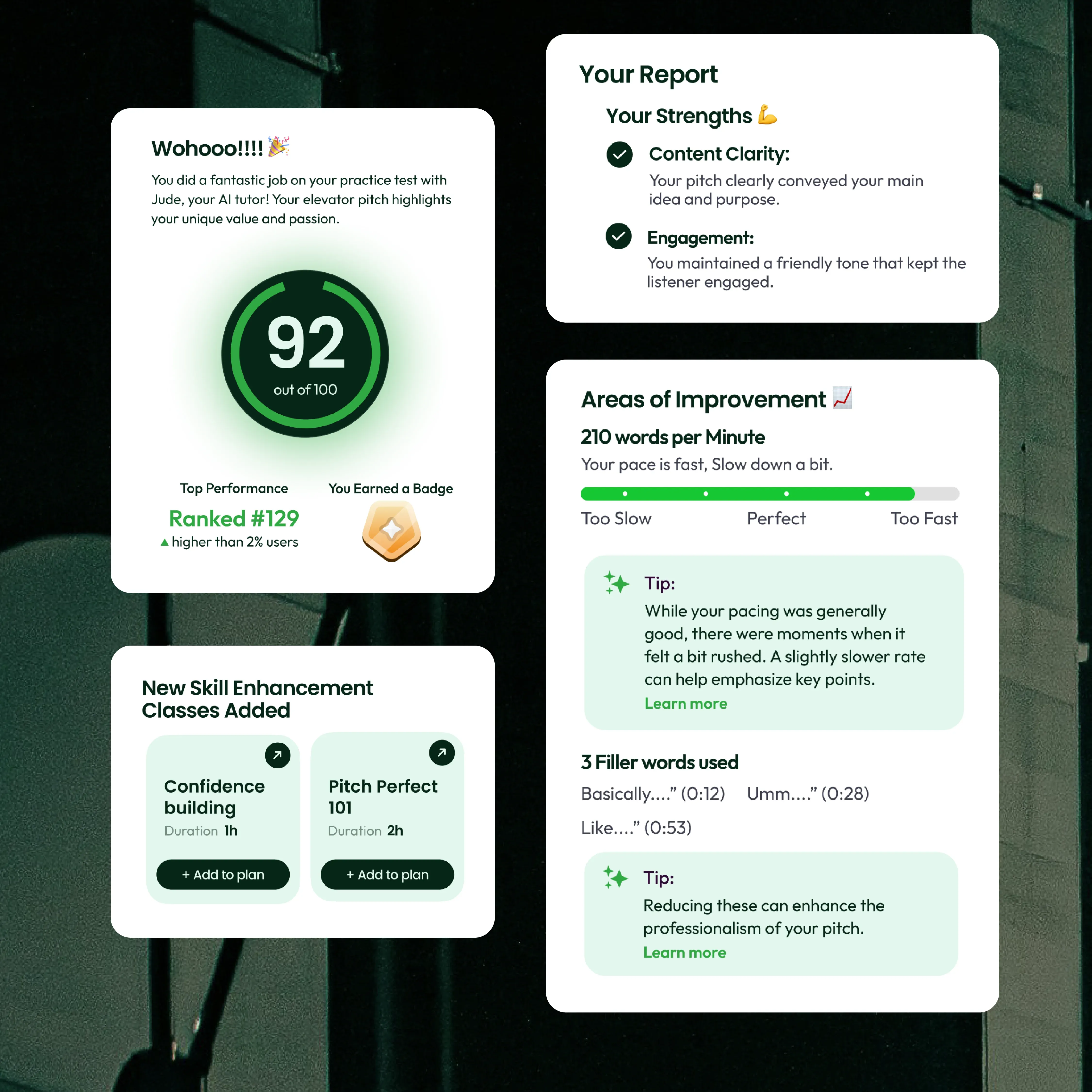
Personalized Progress Score & Feedback Report
Track your growth over time, identify strengths, and discover specific ways to improve with actionable insights.
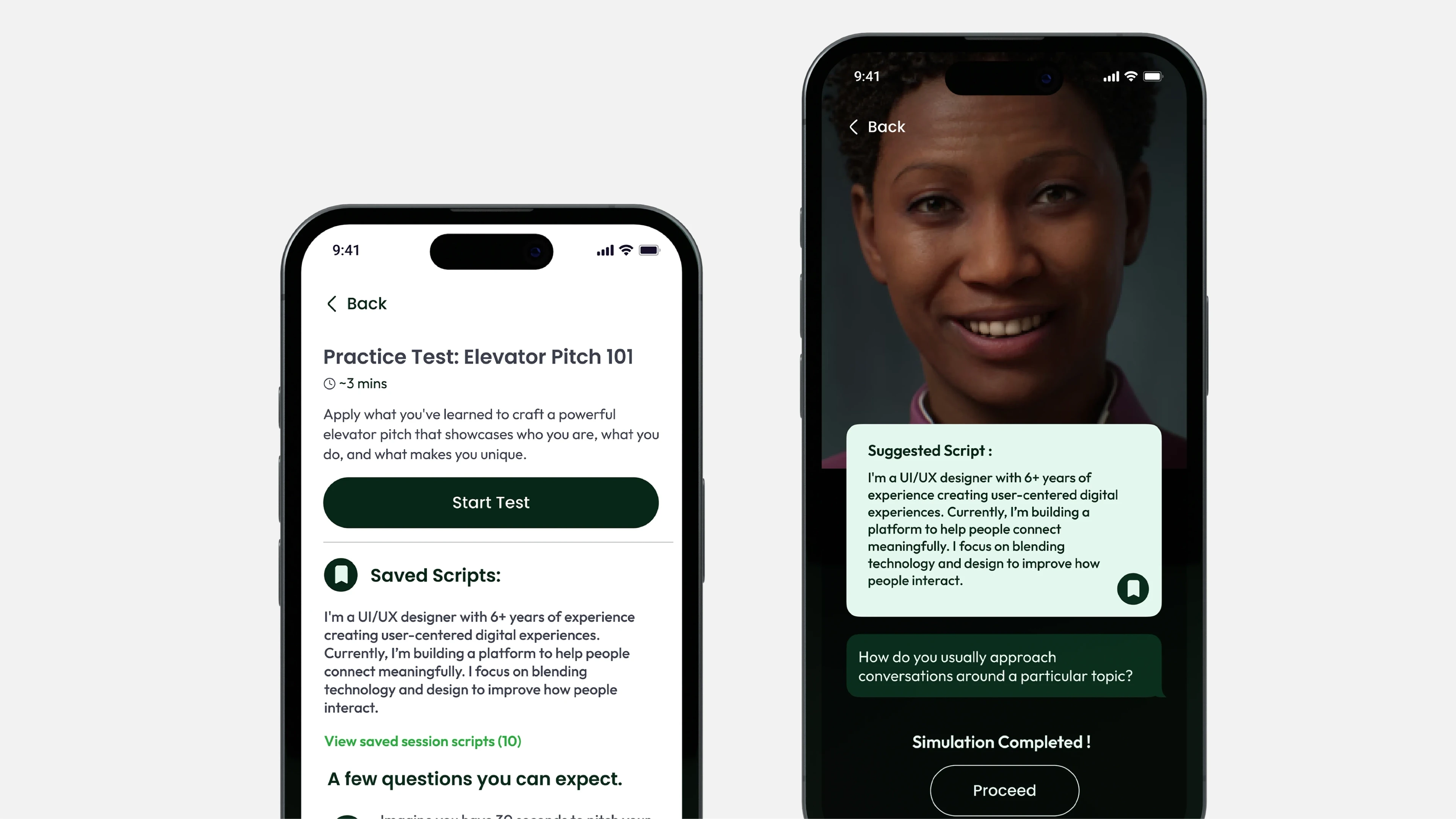
Learn, and grow with your MetaHuman
Ask real-time questions, sharpen your thinking with brain teasers, and receive personalized performance reports.
Solution: Phase 1
Solution: Phase 1
Solution: Phase 1
MetaHuman conversation coach for confident networking
MetaHuman conversation coach for confident networking
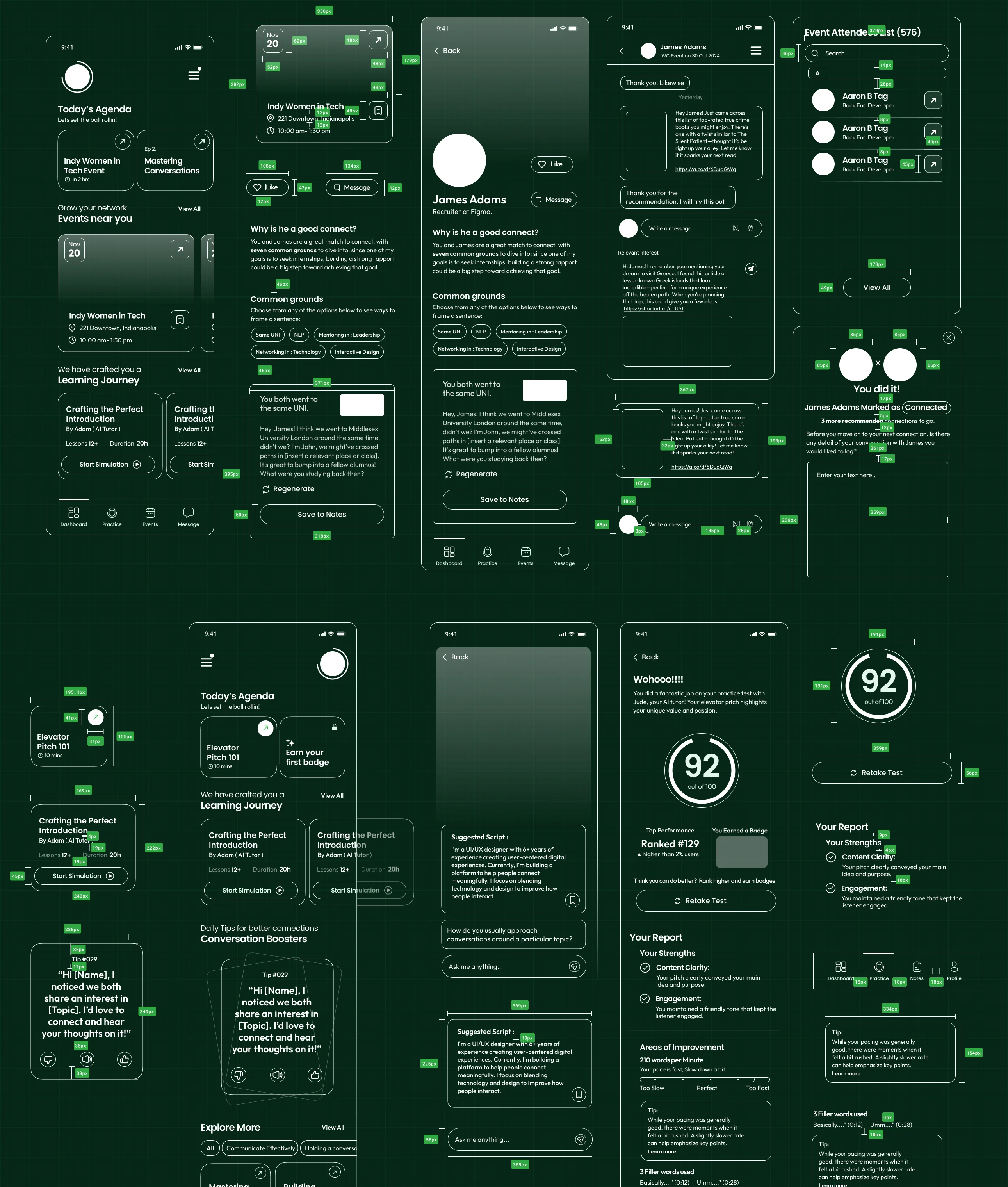
Boost your networking skills with a lifelike MetaHuman that helps you prep, practice, and perfect conversations with real-time feedback. Think of it as a low-pressure rehearsal room where you can try different intros, responses, and follow‑up questions before you ever walk into the actual event.
Personalized Learning & Networking Dashboard
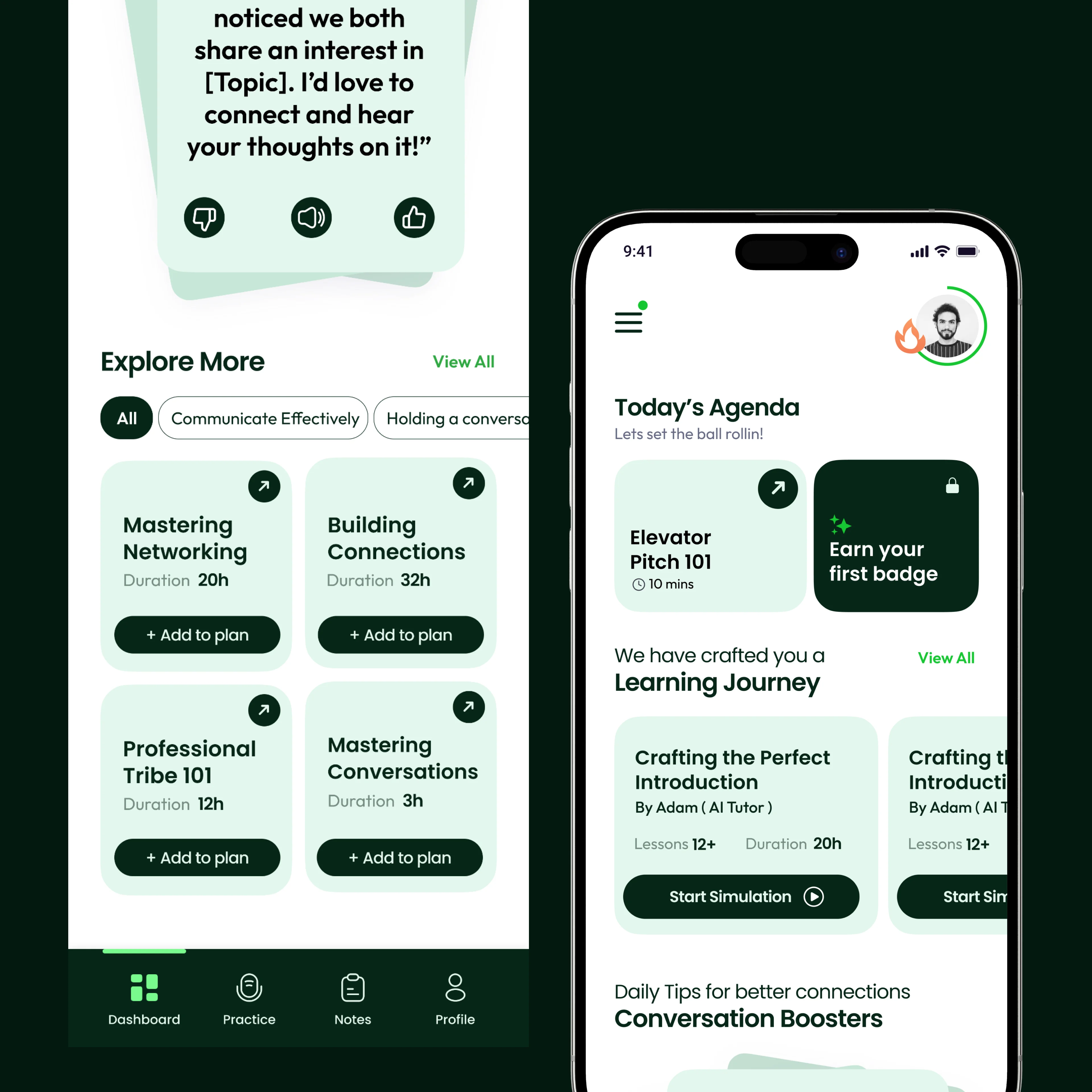
A focused home screen that surfaces today’s agenda, your personalized learning journey, and quick-access modules, so you can jump back into practice, track progress, and discover new networking lessons at a glance.
Personalizing the learning experience
By setting clear goals and time limits, we made the learning journey focused, manageable, and tailored to participants' needs for greater impact.
Test your skills with MetaHuman
Put your networking abilities to the test in a realistic, guided conversation, where you can safely practice answers to tough questions, replay scenarios when you feel nervous, and build confidence before you step into real-world events.
Personalized Progress Score & Feedback Report
Track your growth over time, identify strengths, and discover specific ways to improve with actionable insights.
Learn, and grow with your MetaHuman
Ask real-time questions, sharpen your thinking with brain teasers, and receive personalized performance reports.
Personalized Learning & Networking Dashboard
A focused home screen that surfaces today’s agenda, your personalized learning journey, and quick-access modules, so you can jump back into practice, track progress, and discover new networking lessons at a glance.
Personalizing the learning experience
By setting clear goals and time limits, we made the learning journey focused, manageable, and tailored to participants' needs for greater impact.
Test your skills with MetaHuman
Put your networking abilities to the test in a realistic, guided conversation, where you can safely practice answers to tough questions, replay scenarios when you feel nervous, and build confidence before you step into real-world events.
Personalized Progress Score & Feedback Report
Track your growth over time, identify strengths, and discover specific ways to improve with actionable insights.
Learn, and grow with your MetaHuman
Ask real-time questions, sharpen your thinking with brain teasers, and receive personalized performance reports.
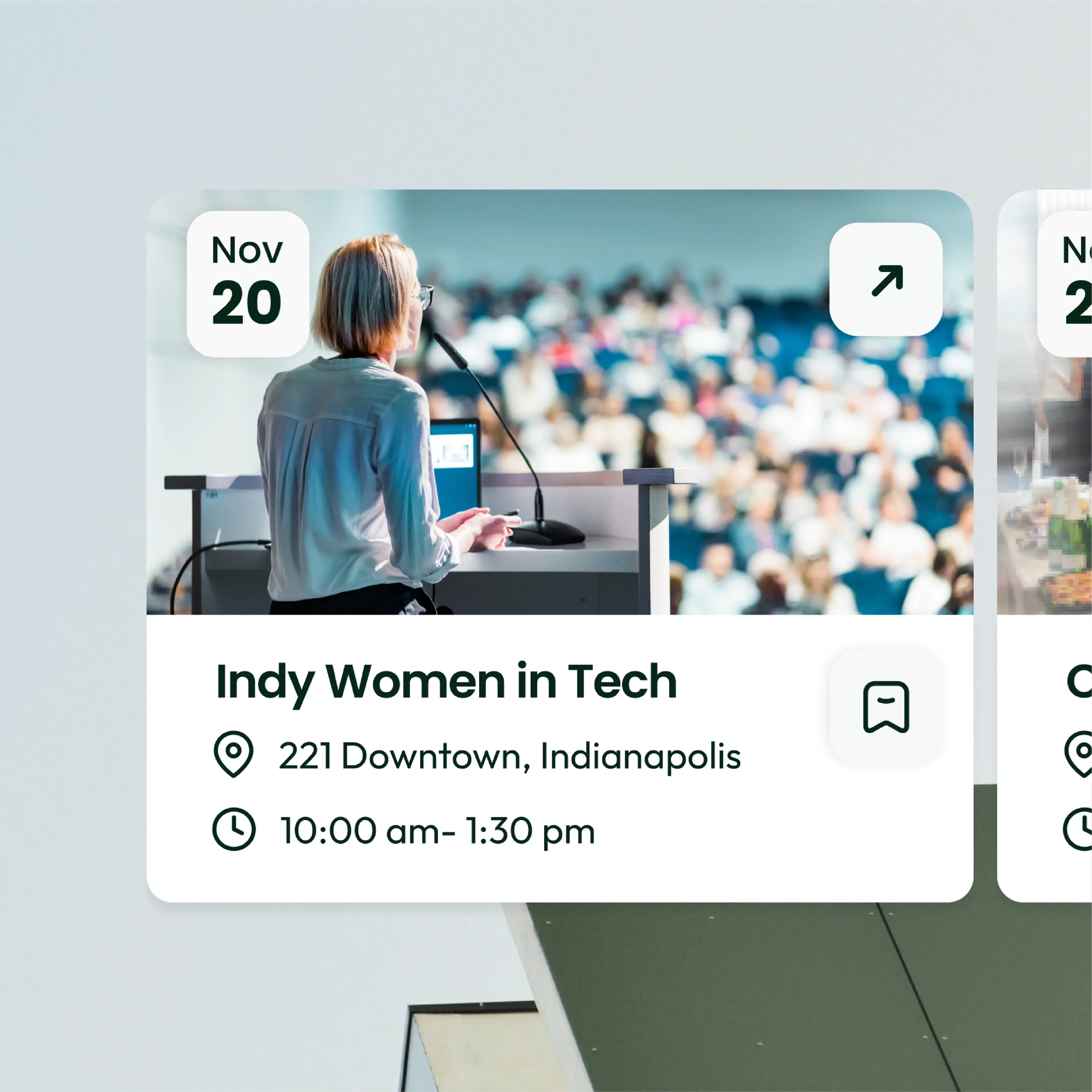
Discover events around you
Get a personalized feed of nearby networking events. So you’re always ready to connect.
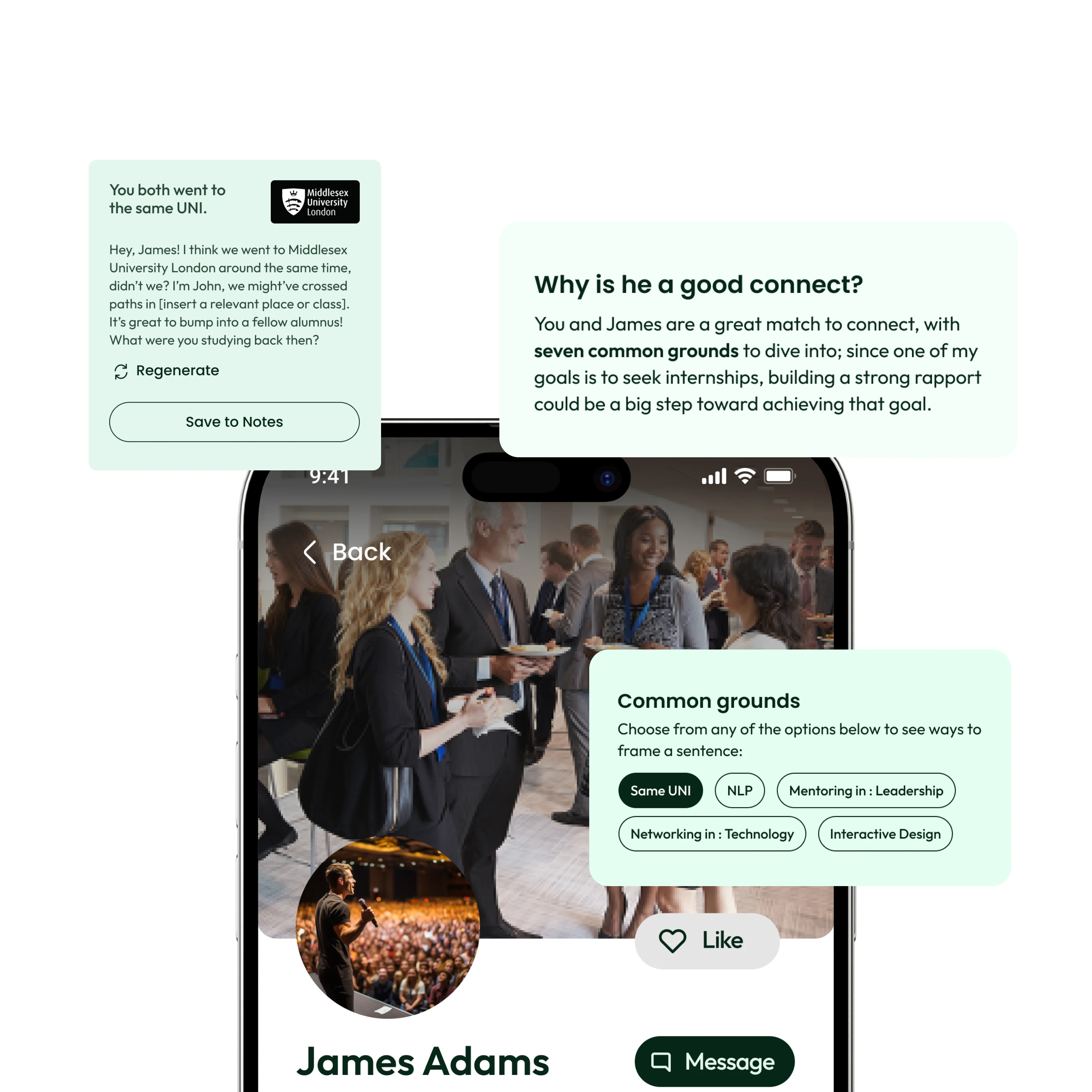
Meet the right people, not just anyone
See who you actually have things in common with—shared interests, goals, or backgrounds. Plus simple icebreaker ideas so it’s easier to start a real conversation, not small talk.
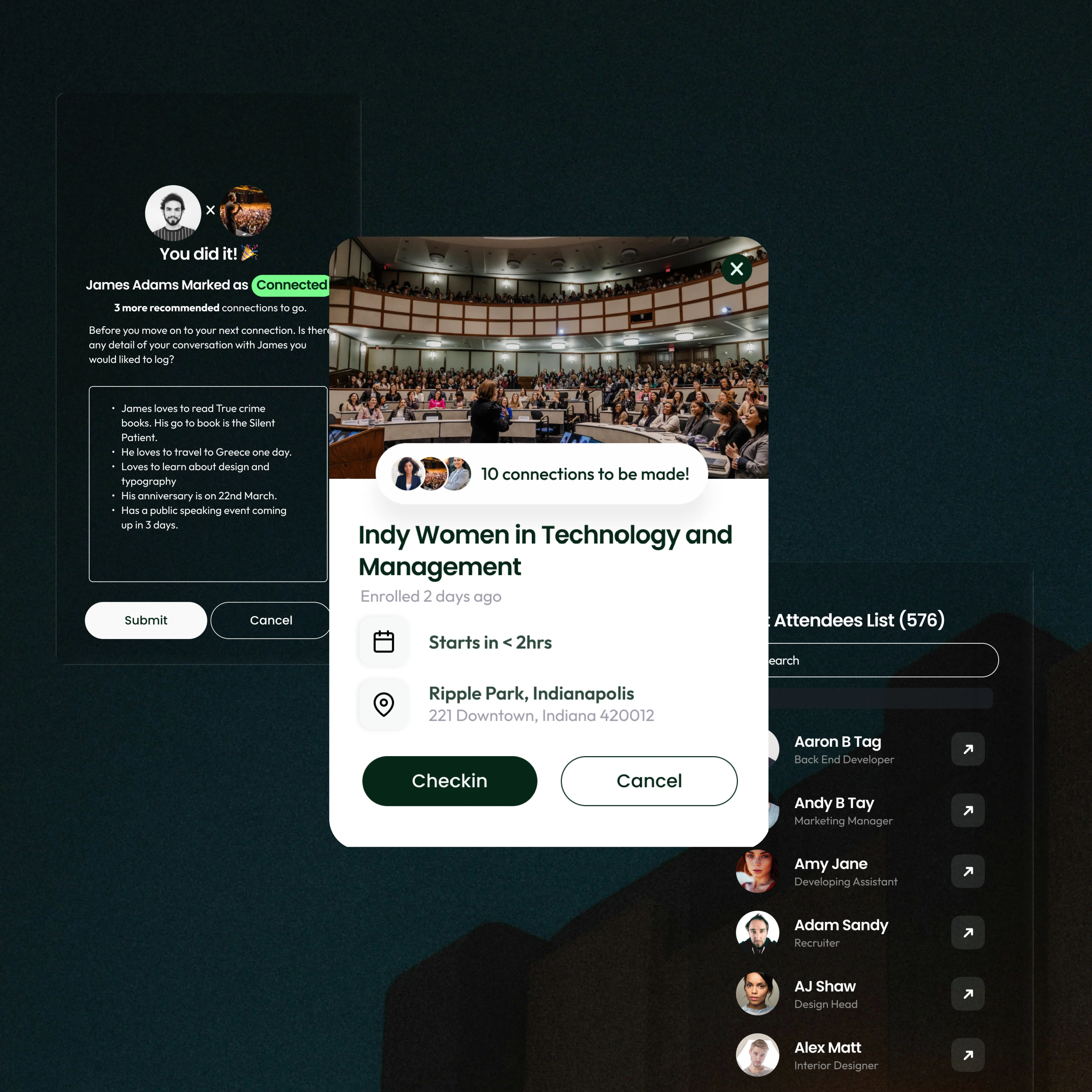
Real talk, real connections - Made easy
Spark meaningful chats with tailored prompts, then save key insights.
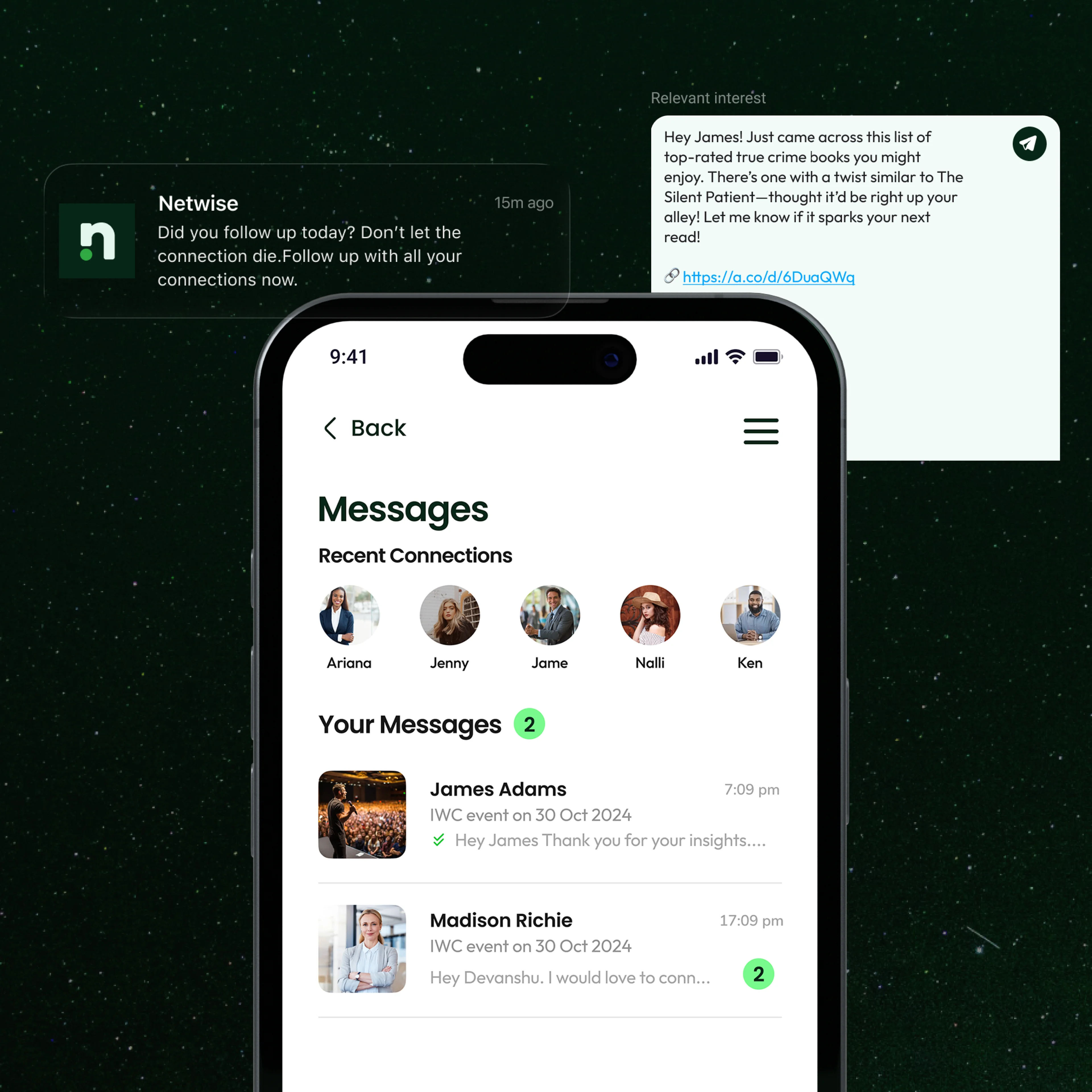
Smart, personal follow-ups that feel real.
Get gentle nudges to reconnect, plus AI-crafted, context-aware messages that reference what you last discussed. So every follow-up feels thoughtful, timely, and genuinely you.
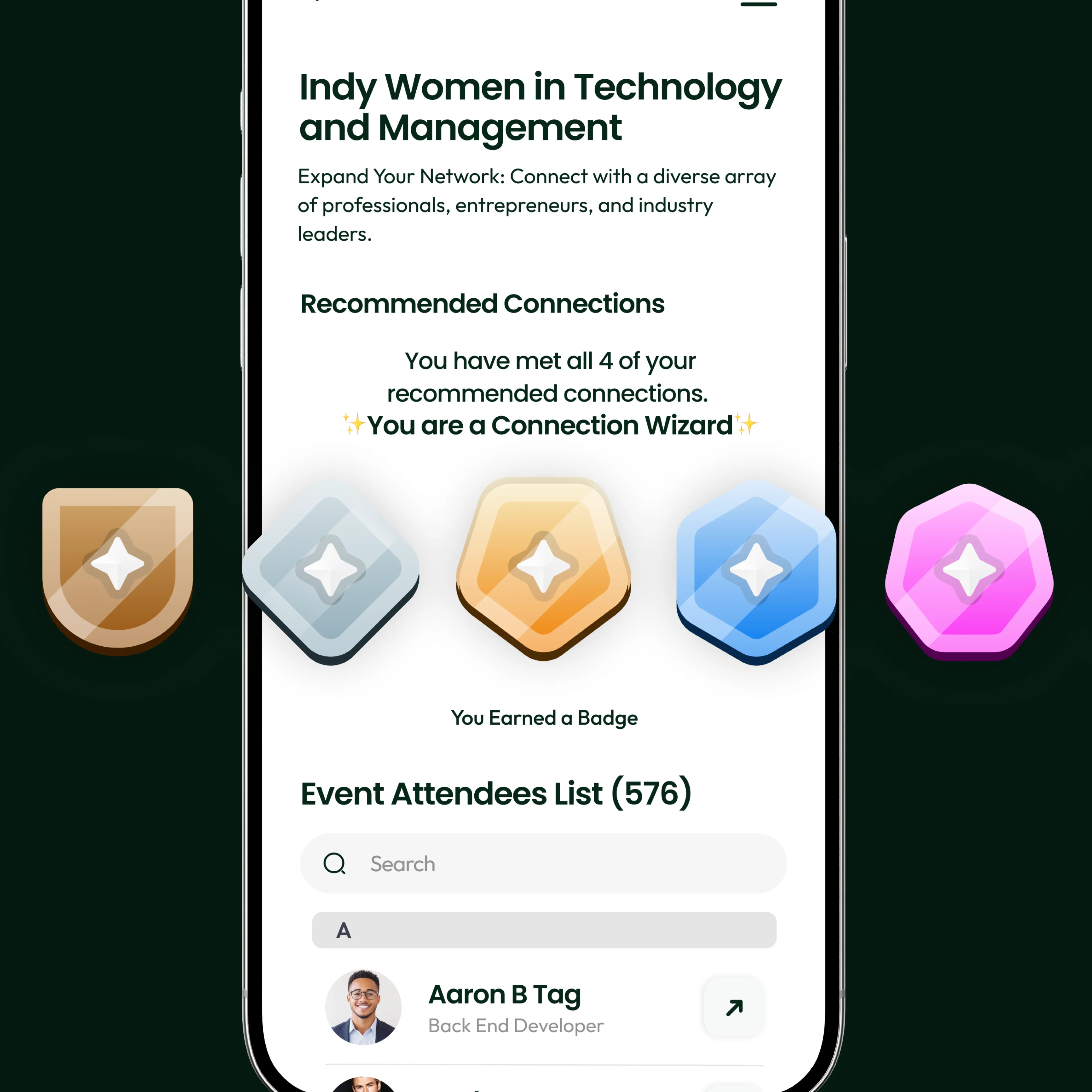
Connection Wizard Badge
Celebrate meeting all your recommended connections with a badge that rewards meaningful new relationships.
Solution: Phase 2
Solution: Phase 2
Solution: Phase 2
From practice to people: Let’s make those connections count
From practice to people: Let’s make those connections count
Confident and ready, you’ll turn small talk into solid connections with tailored conversation starters, smart attendee suggestions, and seamless follow-ups.
Discover events around you
Get a personalized feed of nearby networking events. So you’re always ready to connect.
Meet the right people, not just anyone
See who you actually have things in common with—shared interests, goals, or backgrounds. Plus simple icebreaker ideas so it’s easier to start a real conversation, not small talk.
Real talk, real connections - Made easy
Spark meaningful chats with tailored prompts, then save key insights.
Smart, personal follow-ups that feel real.
Get gentle nudges to reconnect, plus AI-crafted, context-aware messages that reference what you last discussed. So every follow-up feels thoughtful, timely, and genuinely you.
Connection Wizard Badge
Celebrate meeting all your recommended connections with a badge that rewards meaningful new relationships.
Discover events around you
Get a personalized feed of nearby networking events. So you’re always ready to connect.
Meet the right people, not just anyone
See who you actually have things in common with—shared interests, goals, or backgrounds. Plus simple icebreaker ideas so it’s easier to start a real conversation, not small talk.
Real talk, real connections - Made easy
Spark meaningful chats with tailored prompts, then save key insights.
Smart, personal follow-ups that feel real.
Get gentle nudges to reconnect, plus AI-crafted, context-aware messages that reference what you last discussed. So every follow-up feels thoughtful, timely, and genuinely you.
Connection Wizard Badge
Celebrate meeting all your recommended connections with a badge that rewards meaningful new relationships.
Challenge: The lag that breaks the flow
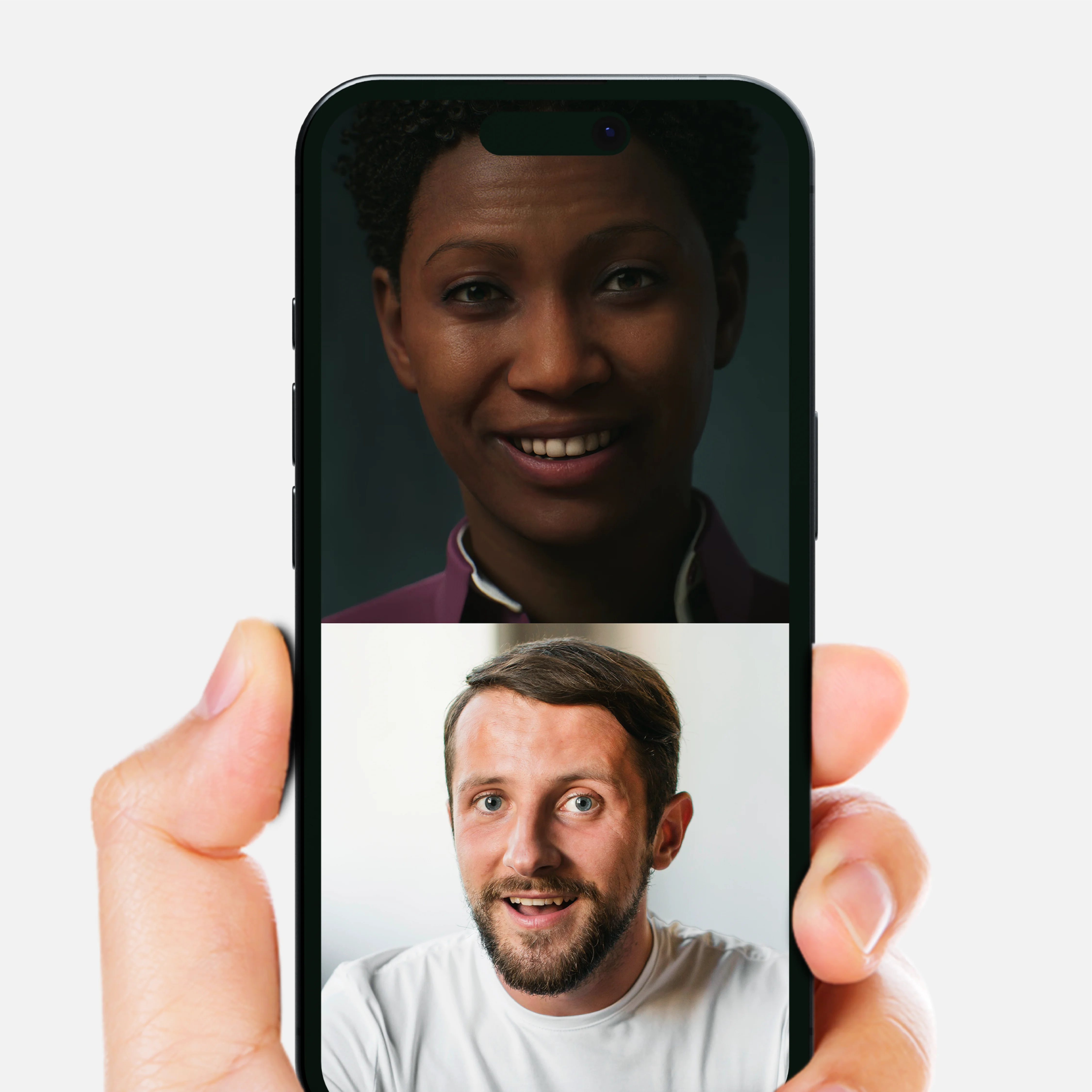
Humans naturally respond within 200–500ms,while AI delays of 1.5–3 seconds can feel awkward and disrupt flow. Delays over 2 seconds can drop engagement by 40%. This responsiveness gap becomes even more noticeable in real-time conversations, especially during networking or coaching scenarios where timing is key to maintaining rapport.
Solution: Ensuring real-time, seamless conversations
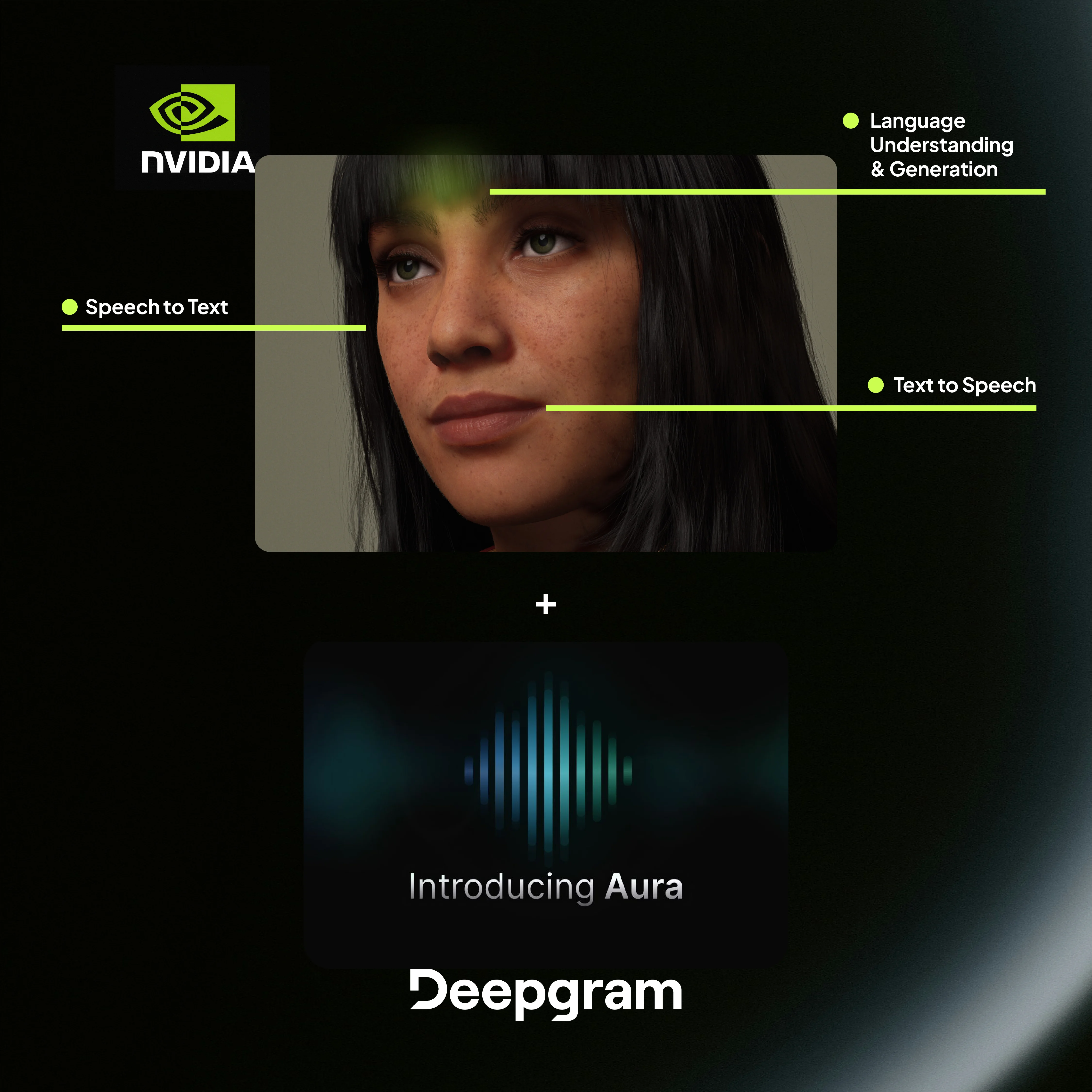
To reduce latency and keep conversations natural, we used Deepgram’s Aura for real-time TTS under 200ms. NVIDIA ACE and Convai powered lifelike speech AI in Unreal Engine MetaHumans for realistic interactions. On-device processing ensures speed and privacy, making networking feel smooth, secure, and human.
Challenge: What’s in it for organizers?
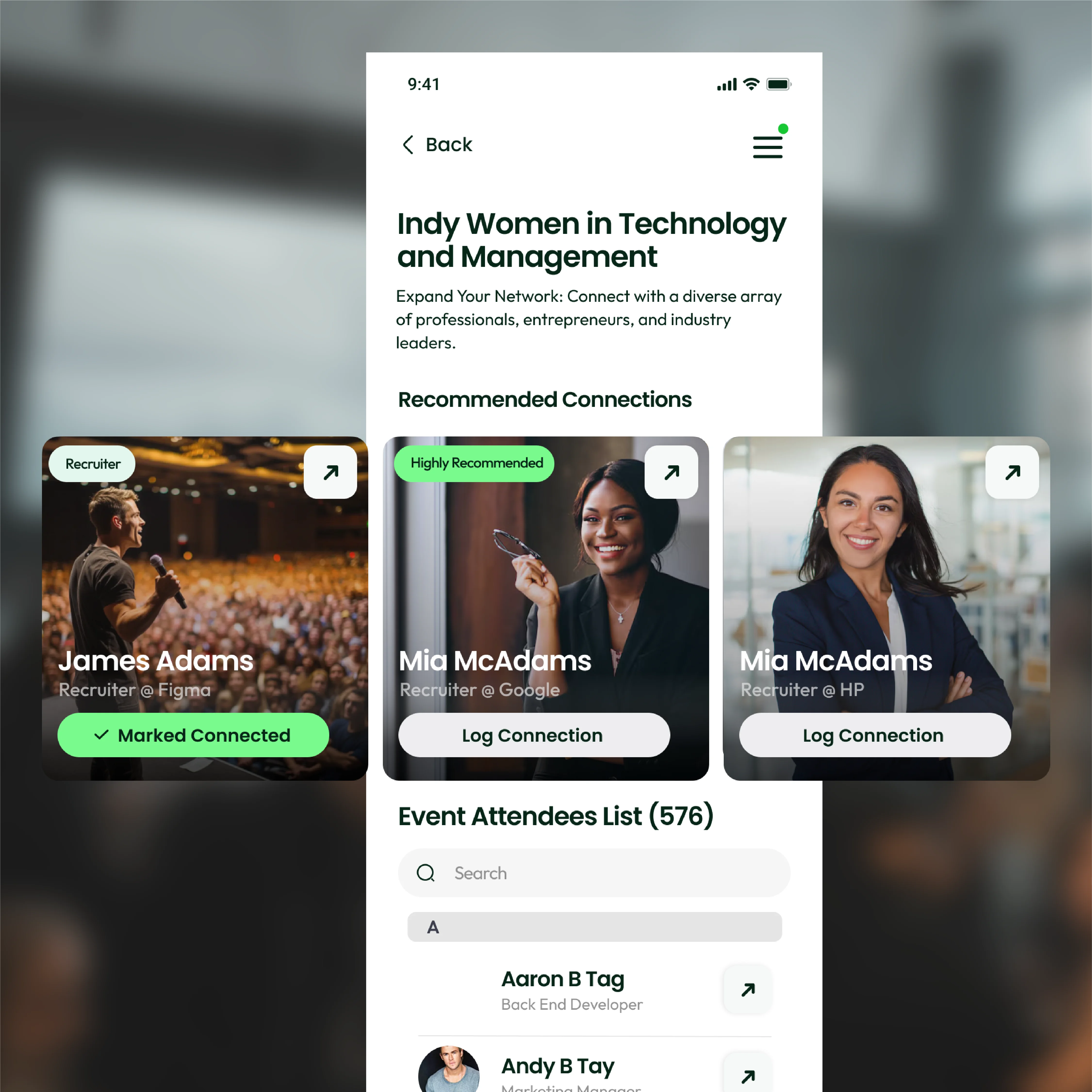
Event organizers may hesitate to host their events on new platforms due to concerns over reach, engagement, and the platform’s ability to provide valuable features for their events. Building credibility and showcasing unique, organizer-friendly features becomes essential to earn their trust and participation.
Solution: Phased rollout
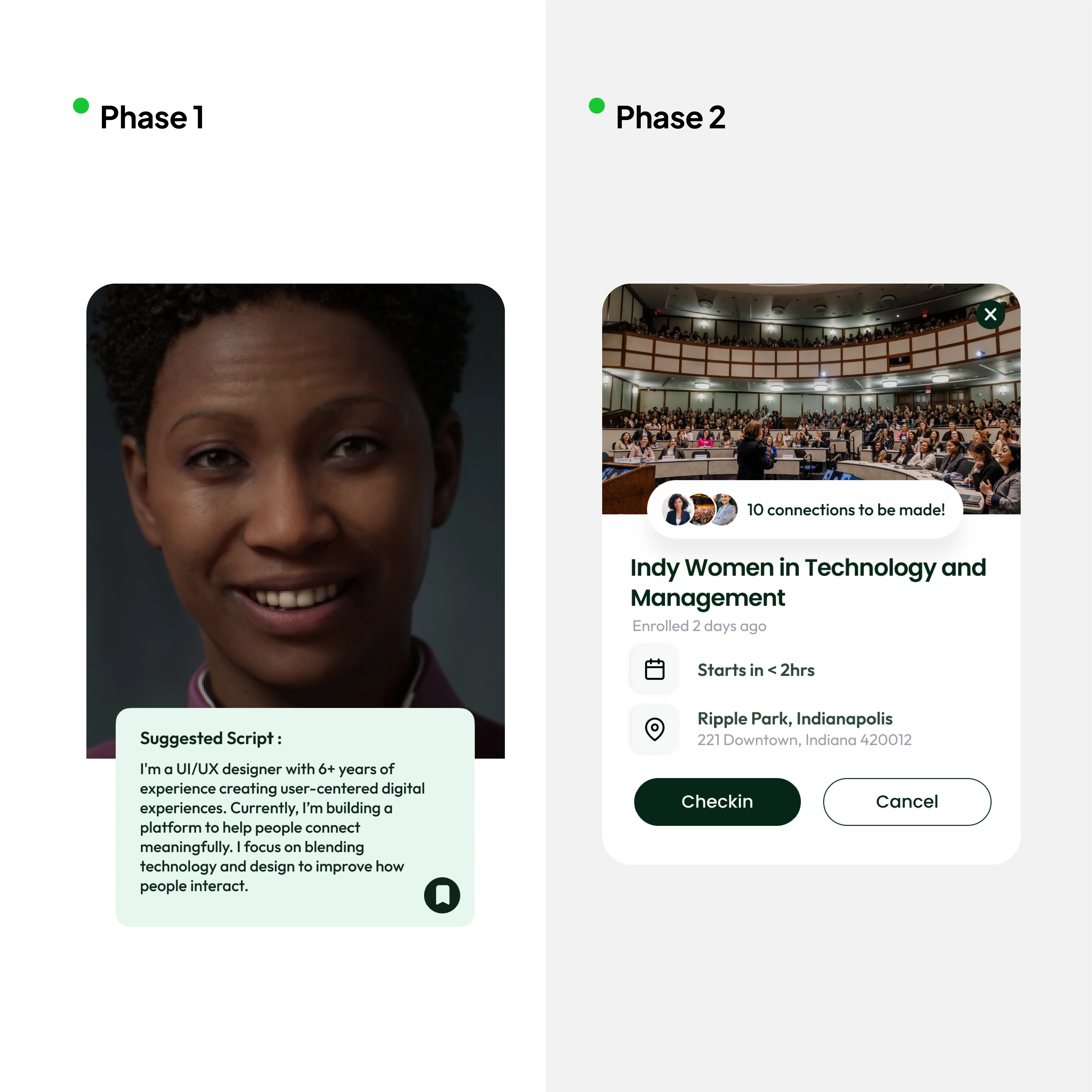
We initially launch as a networking skill-building platform, focusing on helping users gain confidence and refine their abilities. As the user base grows, we gradually introduce event integration, ensuring a seamless transition to real-world networking.
The Challenges
The Challenges
The Challenges
Not always smooth sailing...But I steered through
Not always smooth sailing...But I steered through
Every step came with its own set of challenges, but each obstacle helped shape a smarter, more thoughtful solution.
Challenge: The lag that breaks the flow
Humans naturally respond within 200–500ms,while AI delays of 1.5–3 seconds can feel awkward and disrupt flow. Delays over 2 seconds can drop engagement by 40%. This responsiveness gap becomes even more noticeable in real-time conversations, especially during networking or coaching scenarios where timing is key to maintaining rapport.
Solution: Ensuring real-time, seamless conversations
To reduce latency and keep conversations natural, we used Deepgram’s Aura for real-time TTS under 200ms. NVIDIA ACE and Convai powered lifelike speech AI in Unreal Engine MetaHumans for realistic interactions. On-device processing ensures speed and privacy, making networking feel smooth, secure, and human.
Challenge: What’s in it for organizers?
Event organizers may hesitate to host their events on new platforms due to concerns over reach, engagement, and the platform’s ability to provide valuable features for their events. Building credibility and showcasing unique, organizer-friendly features becomes essential to earn their trust and participation.
Solution: Phased rollout
We initially launch as a networking skill-building platform, focusing on helping users gain confidence and refine their abilities. As the user base grows, we gradually introduce event integration, ensuring a seamless transition to real-world networking.
Challenge: The lag that breaks the flow
Humans naturally respond within 200–500ms,while AI delays of 1.5–3 seconds can feel awkward and disrupt flow. Delays over 2 seconds can drop engagement by 40%. This responsiveness gap becomes even more noticeable in real-time conversations, especially during networking or coaching scenarios where timing is key to maintaining rapport.
Solution: Ensuring real-time, seamless conversations
To reduce latency and keep conversations natural, we used Deepgram’s Aura for real-time TTS under 200ms. NVIDIA ACE and Convai powered lifelike speech AI in Unreal Engine MetaHumans for realistic interactions. On-device processing ensures speed and privacy, making networking feel smooth, secure, and human.
Challenge: What’s in it for organizers?
Event organizers may hesitate to host their events on new platforms due to concerns over reach, engagement, and the platform’s ability to provide valuable features for their events. Building credibility and showcasing unique, organizer-friendly features becomes essential to earn their trust and participation.
Solution: Phased rollout
We initially launch as a networking skill-building platform, focusing on helping users gain confidence and refine their abilities. As the user base grows, we gradually introduce event integration, ensuring a seamless transition to real-world networking.
The Impact
The Impact
The Impact
So was it really helpful? Let the stats talk and reveal our true impact
So was it really helpful? Let the stats talk and reveal our true impact
Following our post-launch UX satisfaction survey, I gathered valuable insights. Here is what the data reveals about the user experience.
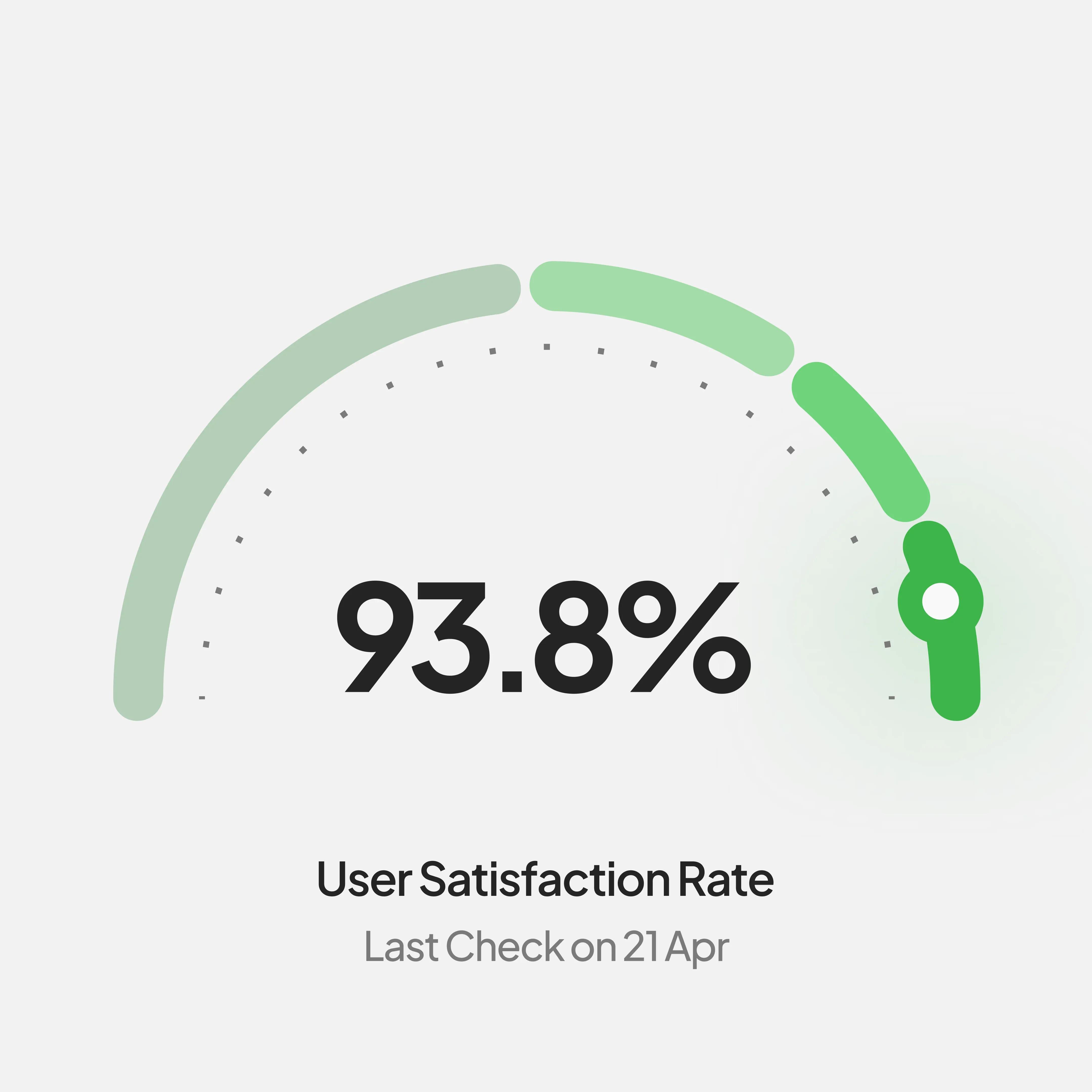
User Satisfaction (CSAT)
Measures how happy or satisfied users are with a product or experience, usually on a simple scale.
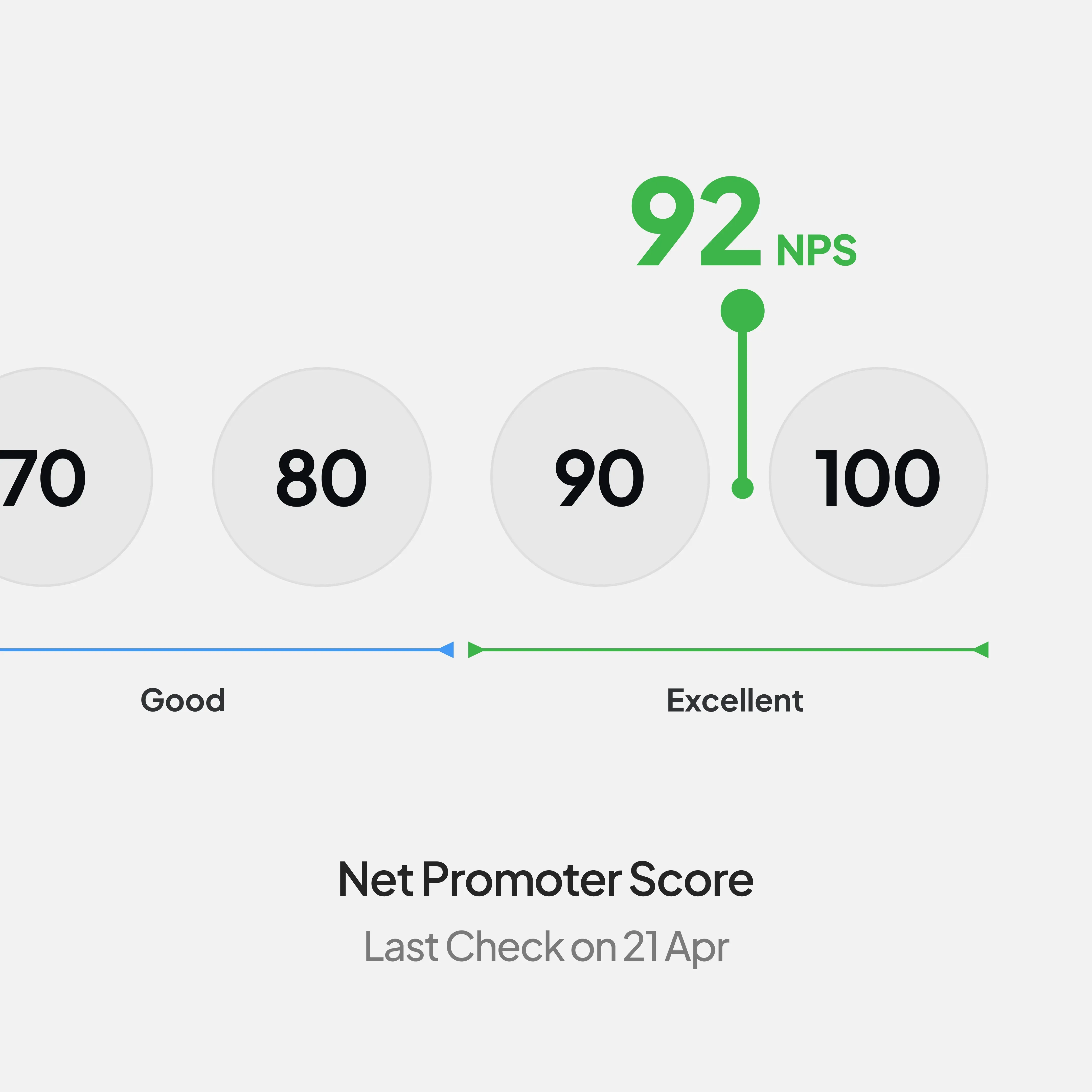
Net Promoter Score (NPS)
Gauges the likelihood that users would recommend a product to others, indicating overall loyalty and satisfaction.
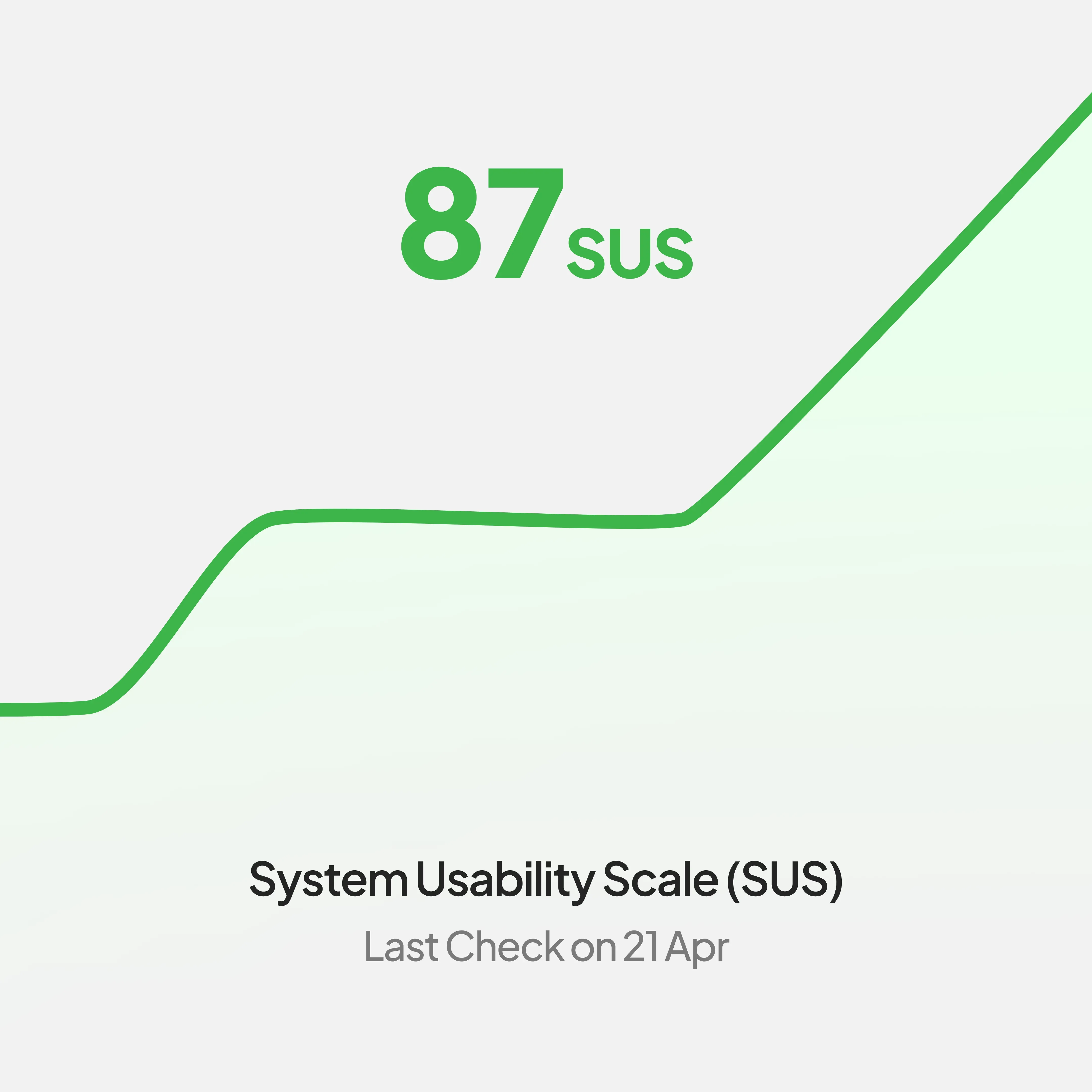
System Usability Scale (SUS)
A standardized 10-question survey that produces a single score reflecting perceived usability of a system.
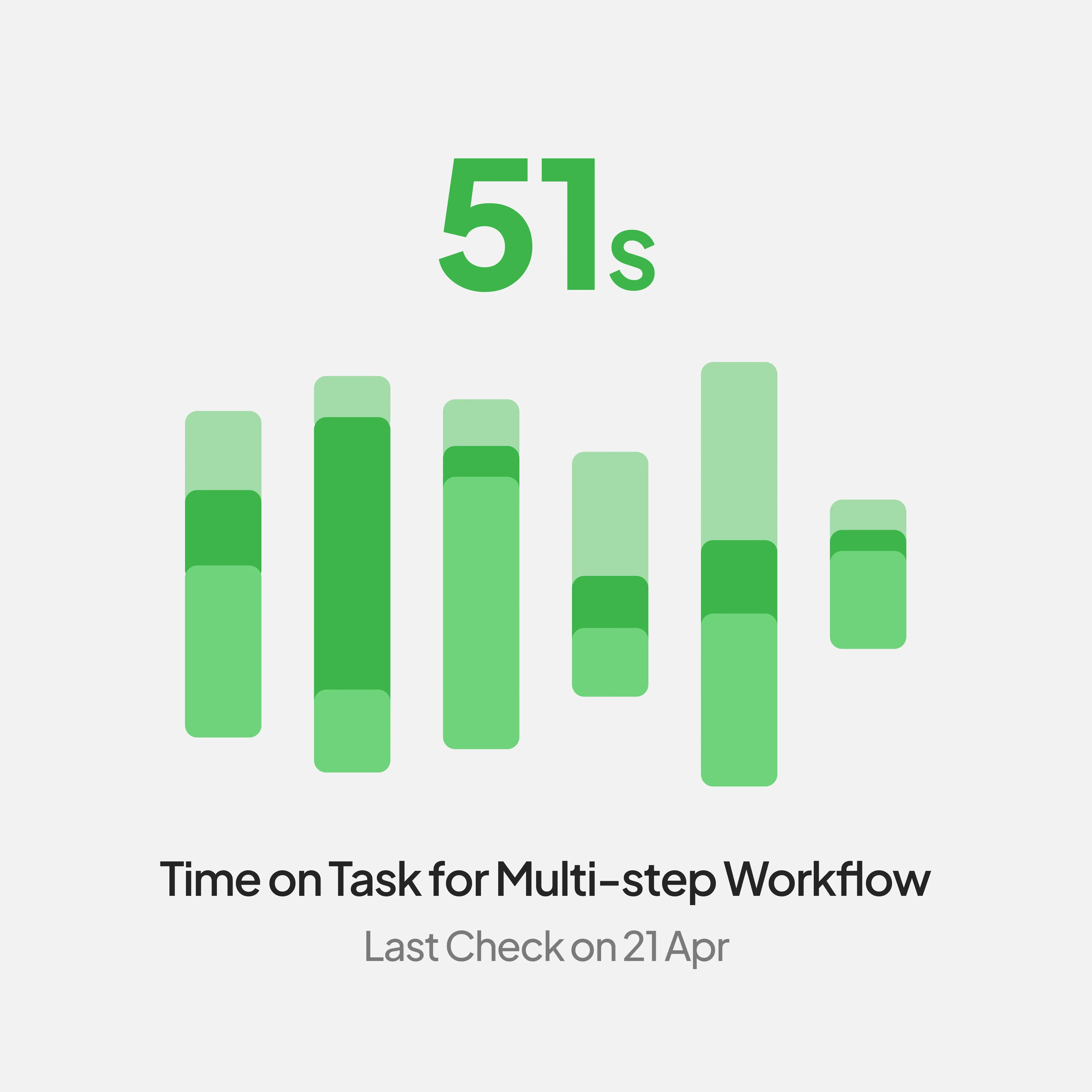
Time on Task (ToT)
Measures how long it takes users to complete a specific task, indicating efficiency and ease of use.
User Satisfaction (CSAT)
Measures how happy or satisfied users are with a product or experience, usually on a simple scale.
Net Promoter Score (NPS)
Gauges the likelihood that users would recommend a product to others, indicating overall loyalty and satisfaction.
System Usability Scale (SUS)
A standardized 10-question survey that produces a single score reflecting perceived usability of a system.
Time on Task (ToT)
Measures how long it takes users to complete a specific task, indicating efficiency and ease of use.
User Satisfaction (CSAT)
Measures how happy or satisfied users are with a product or experience, usually on a simple scale.
Net Promoter Score (NPS)
Gauges the likelihood that users would recommend a product to others, indicating overall loyalty and satisfaction.
System Usability Scale (SUS)
A standardized 10-question survey that produces a single score reflecting perceived usability of a system.
Time on Task (ToT)
Measures how long it takes users to complete a specific task, indicating efficiency and ease of use.
Microinteractions
Microinteractions
Microinteractions
Microinteractions in Netwise turn small moments into meaningful feedback, helping the product feel more responsive, human, and trustworthy. They gently guide users, celebrate progress, and keep the experience feeling smooth instead of scripted.
Microinteractions in Netwise turn small moments into meaningful feedback, helping the product feel more responsive, human, and trustworthy. They gently guide users, celebrate progress, and keep the experience feeling smooth instead of scripted.
Thoughtful microinteractions acknowledge user actions in real time, from subtle visual cues to satisfying confirmations that reduce uncertainty and friction. They reinforce core behaviors like practicing, connecting, and following up, without overwhelming the interface or the user. By timing these responses with care, Netwise maintains a natural conversational rhythm that supports confidence-building rather than distraction. Over time, these tiny touches add up, making the product feel polished, intentional, and genuinely supportive of users’ networking journeys.
User Testing
User Testing
User Testing
A/B Testing
A/B Testing
A/B testing helped compare competing Netwise design variations to see which options actually improved engagement and task success. This made design decisions more objective, reducing guesswork and validating changes with real user behavior.
A/B testing helped compare competing Netwise design variations to see which options actually improved engagement and task success. This made design decisions more objective, reducing guesswork and validating changes with real user behavior.
By systematically testing alternatives like compact versus detailed cards and tabbed versus inline script navigation, we could see where users felt more informed, confident, and willing to continue. The winning variants reduced friction, improved browsing clarity, and better supported natural conversation workflows. These experiments also revealed hidden usability issues that might not surface in interviews alone, guiding targeted refinements rather than broad redesigns.
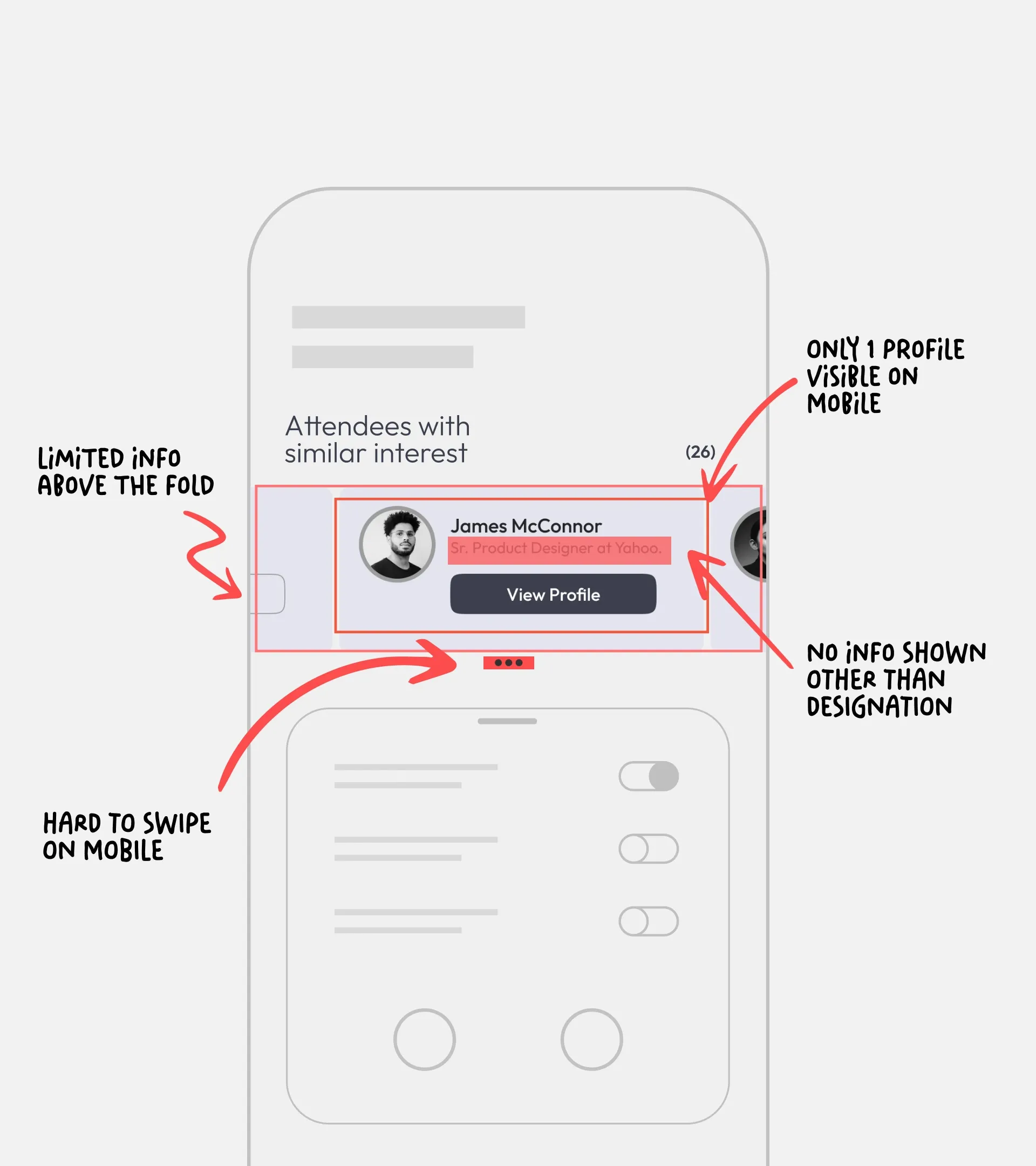
Compact Cards vs. Detailed Cards | A
Users found this layout restrictive with limited info and poor mobile navigation.
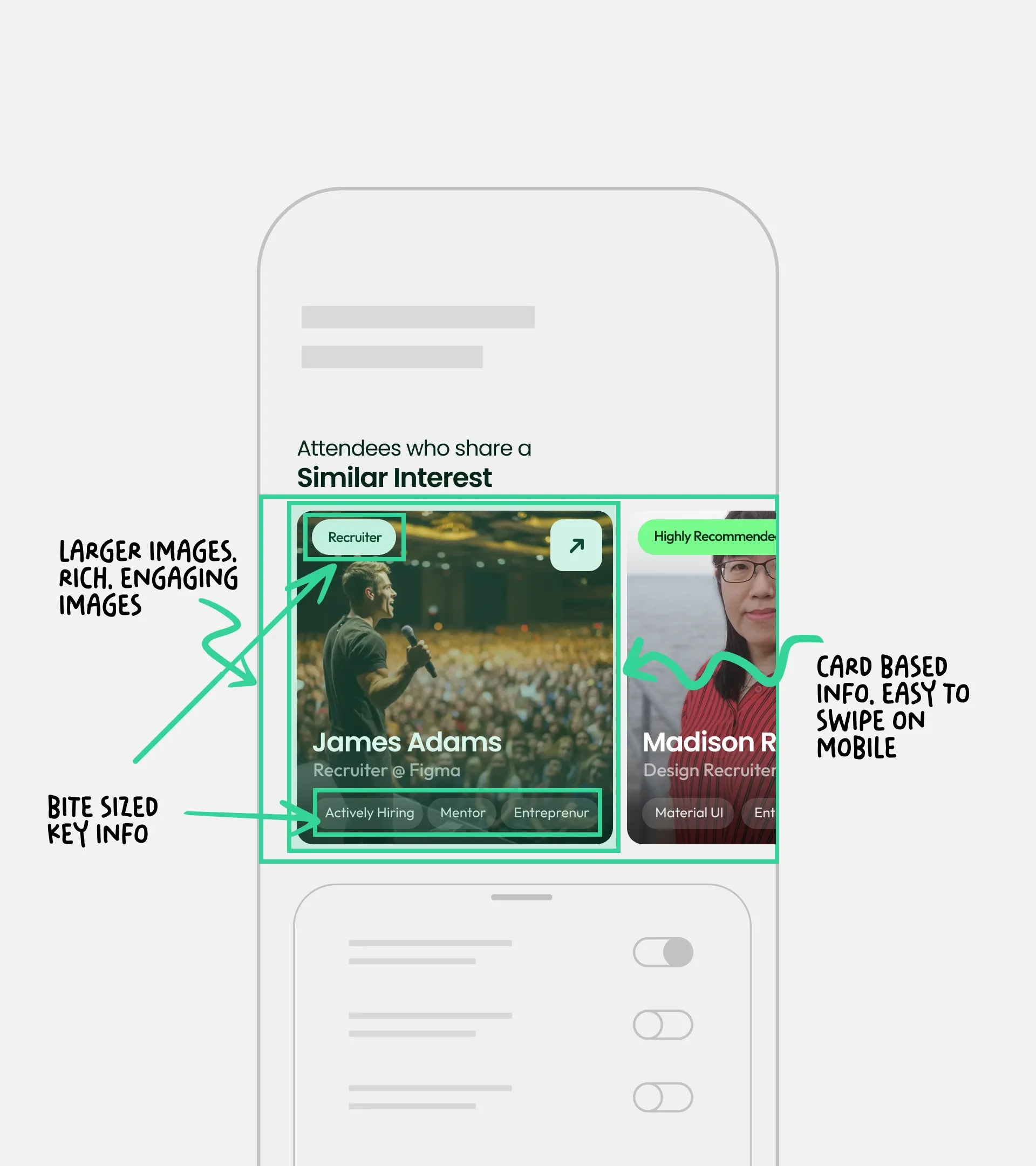
Compact Cards vs. Detailed Cards | B
Users favored this design for its larger images and richer details, enhancing browsing and engagement.
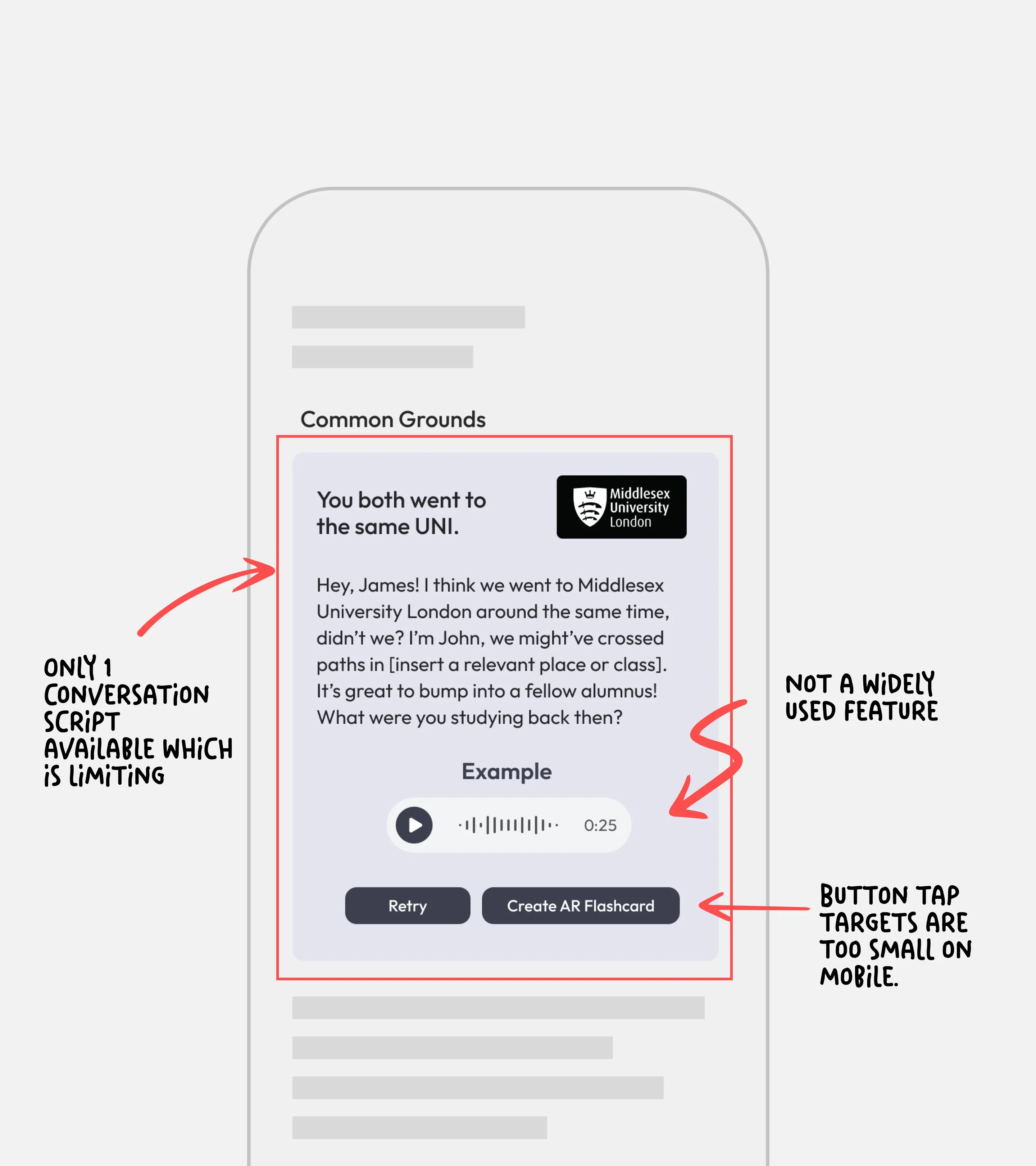
Tabbed vs. Inline Script Navigation | A
Users often struggled to understand how to move between different sections of the content.
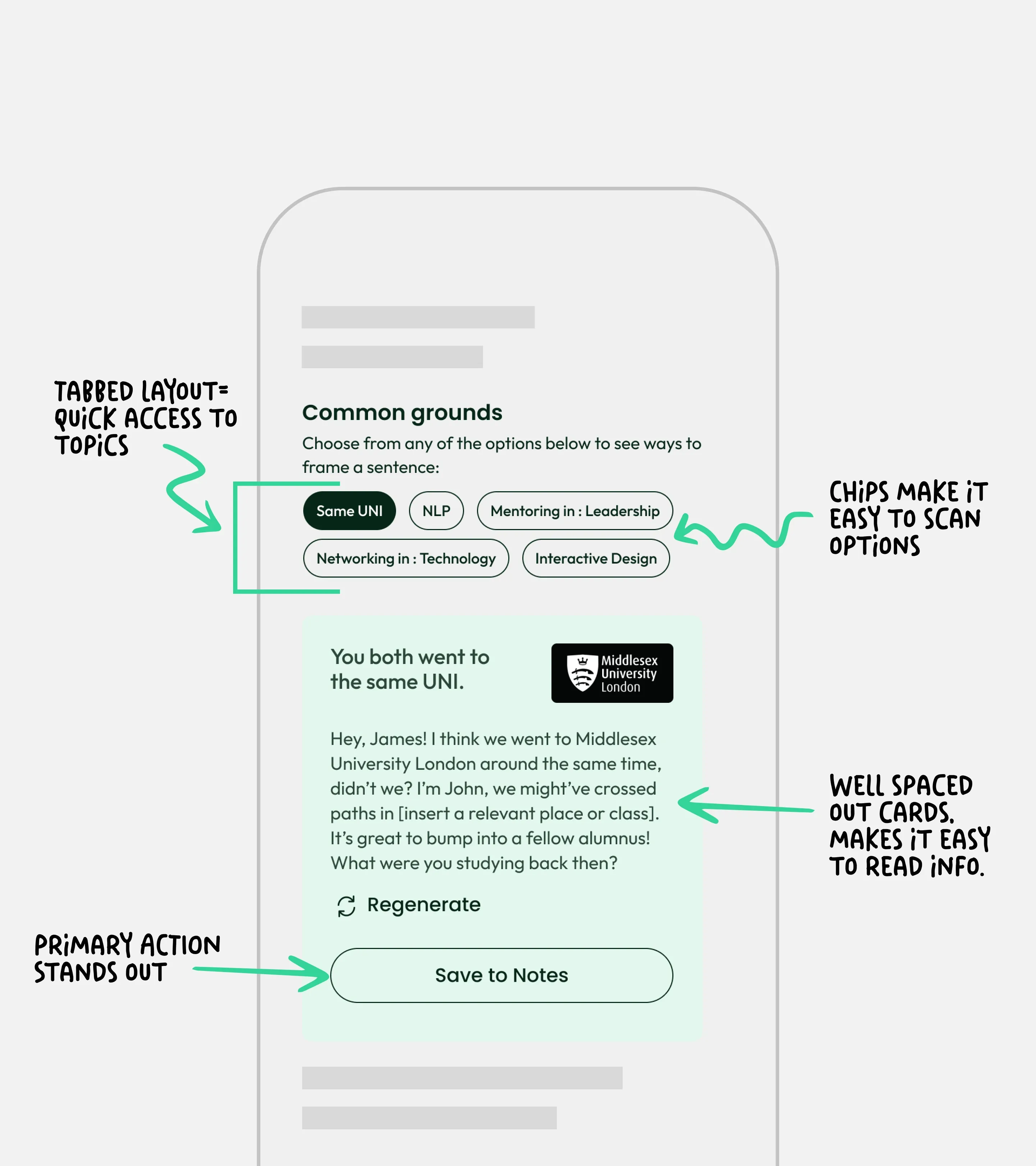
Tabbed vs. Inline Script Navigation | B
Users preferred the tabbed layout for easy access to common grounds and scripts.
Compact Cards vs. Detailed Cards | A
Users found this layout restrictive with limited info and poor mobile navigation.
Compact Cards vs. Detailed Cards | B
Users favored this design for its larger images and richer details, enhancing browsing and engagement.
Tabbed vs. Inline Script Navigation | A
Users often struggled to understand how to move between different sections of the content.
Tabbed vs. Inline Script Navigation | B
Users preferred the tabbed layout for easy access to common grounds and scripts.
Compact Cards vs. Detailed Cards | A
Users found this layout restrictive with limited info and poor mobile navigation.
Compact Cards vs. Detailed Cards | B
Users favored this design for its larger images and richer details, enhancing browsing and engagement.
Tabbed vs. Inline Script Navigation | A
Users often struggled to understand how to move between different sections of the content.
Tabbed vs. Inline Script Navigation | B
Users preferred the tabbed layout for easy access to common grounds and scripts.
Heuristic Evaluation
Heuristic Evaluation
Heuristic evaluations allowed us to review Netwise against established usability principles and quickly uncover friction points before they reached real users. This expert review step turned vague UX concerns into a clear, prioritized list of issues to fix.
Heuristic evaluations allowed us to review Netwise against established usability principles and quickly uncover friction points before they reached real users. This expert review step turned vague UX concerns into a clear, prioritized list of issues to fix.
By walking through key flows with Nielsen-inspired heuristics like visibility of system status, match with real-world language, and error prevention, we could spot confusing labels, overloaded screens, and inconsistent patterns early. These findings helped the team make targeted improvements that simplified navigation and reduced cognitive load without needing a full usability lab setup. Because heuristic evaluations are fast and cost‑effective, they became a repeatable checkpoint in the design cycle, complementing user testing and ensuring the interface stayed intuitive as Netwise evolved.
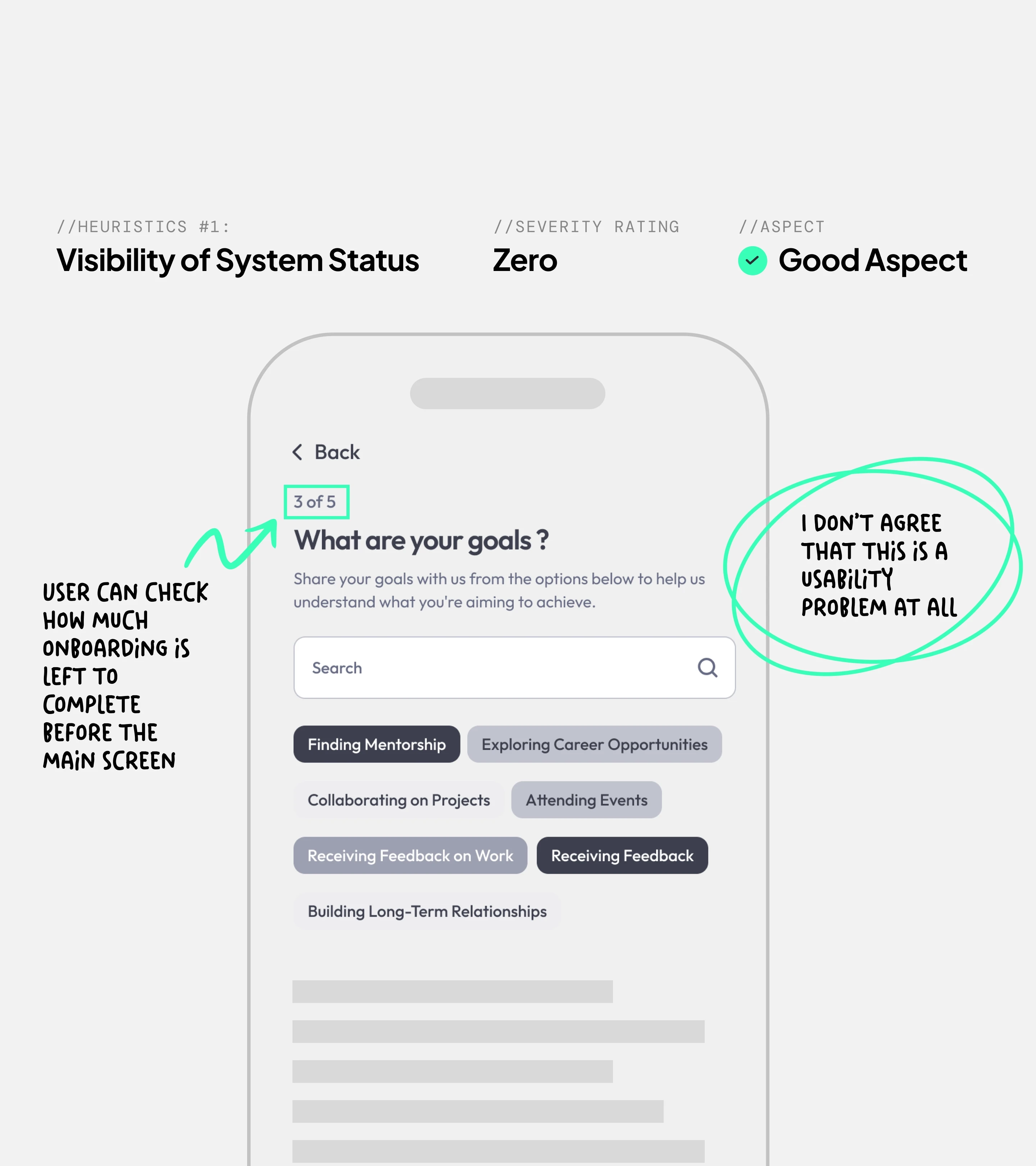
Visibility of system status
The system should always keep users informed about what is going on, through appropriate feedback within a reasonable time.
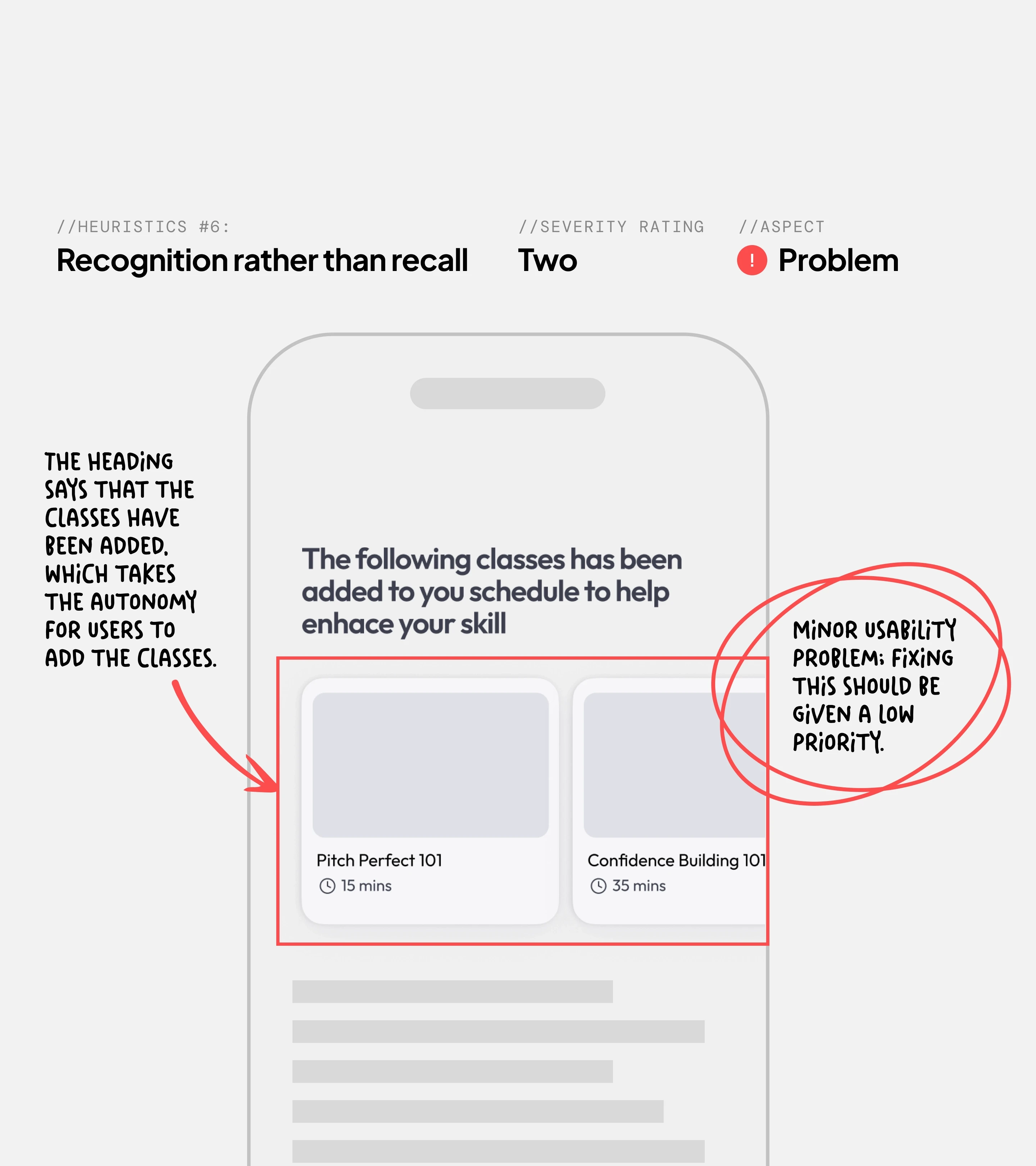
Recognition rather than recall
Minimize users’ memory load by making objects, actions, and options visible so they do not have to remember information from one part of the dialogue to another.
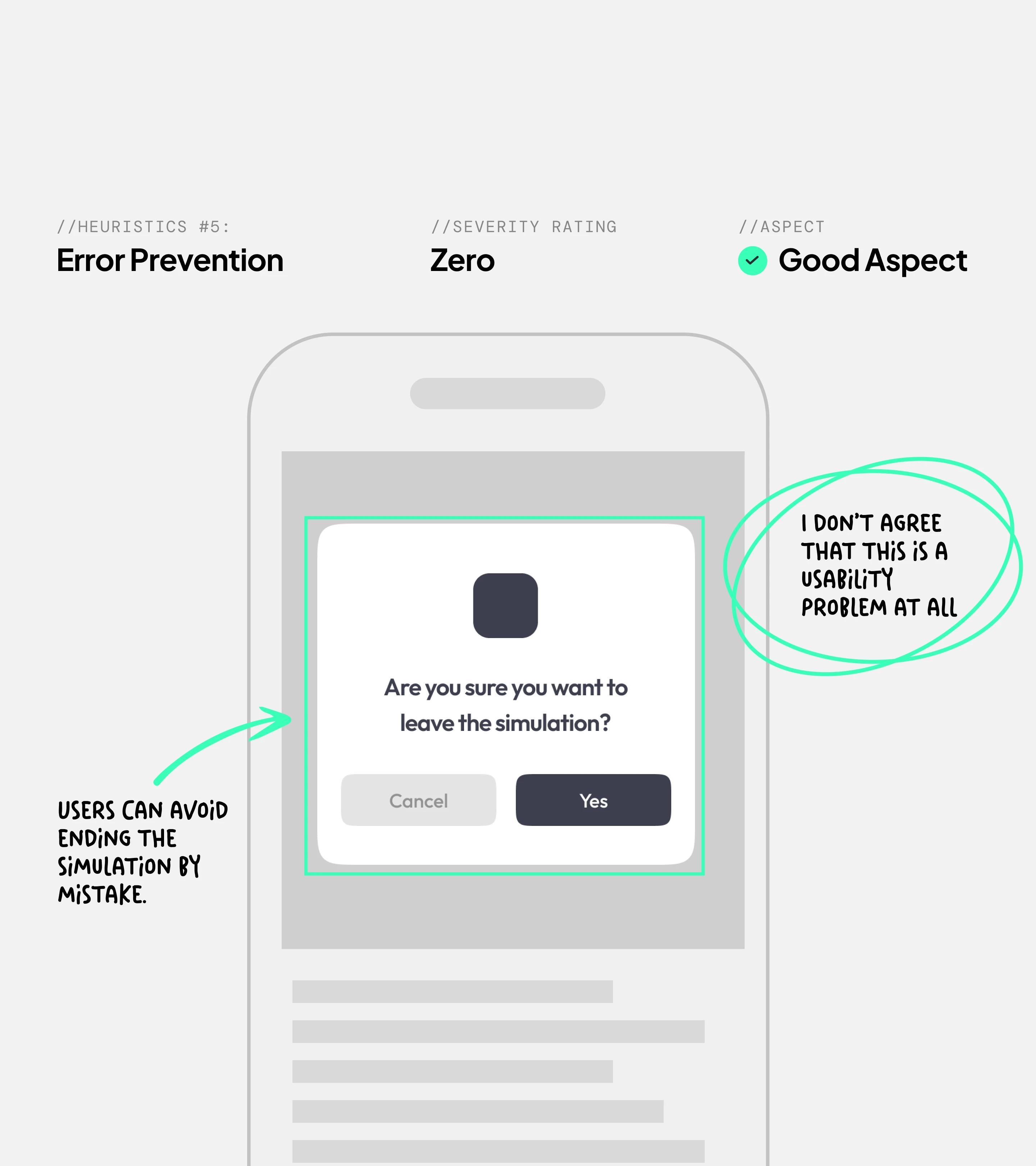
Error prevention
Even better than good error messages is a careful design that prevents a problem from occurring in the first place.
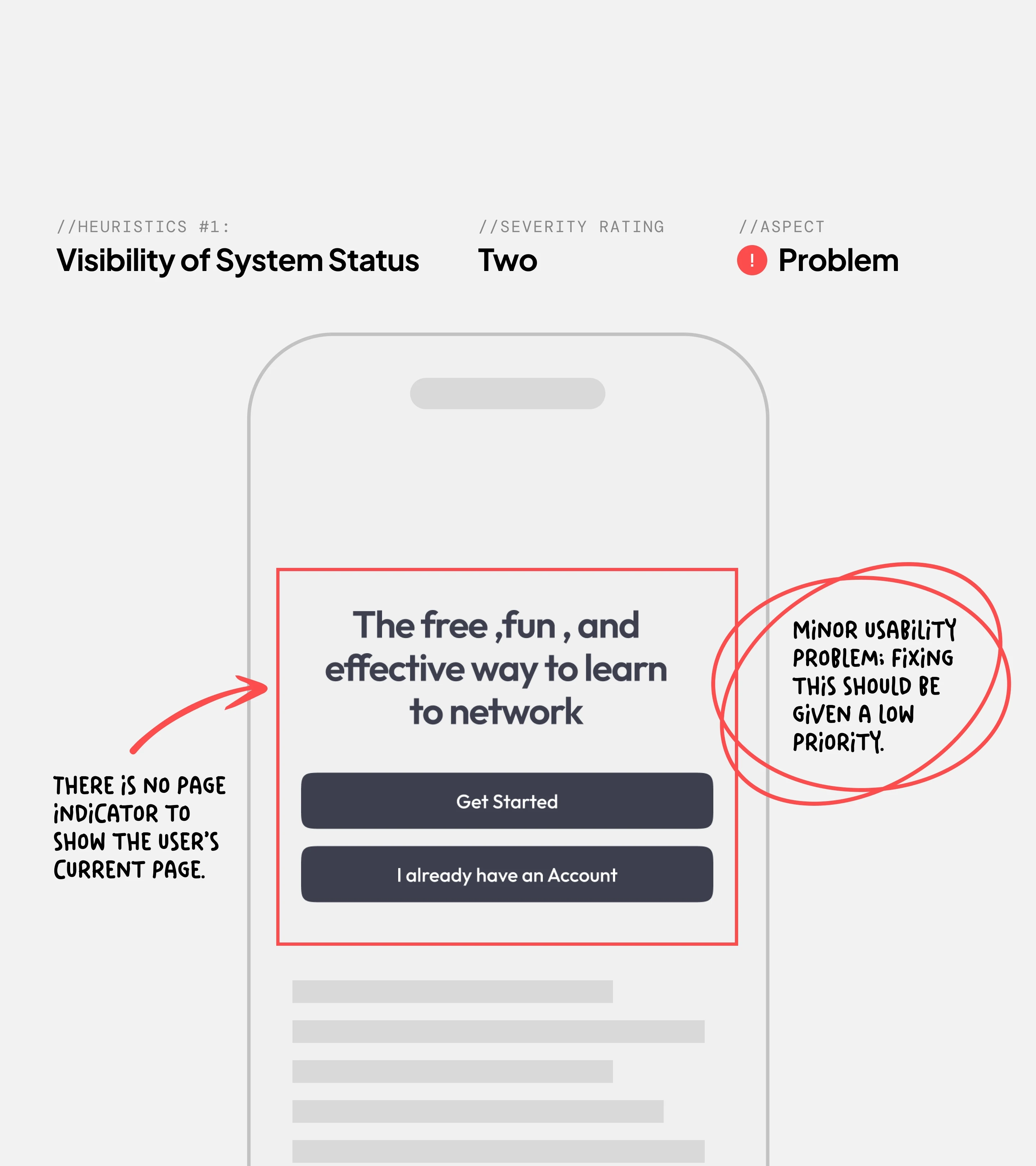
Visibility of system status
The system should always keep users informed about what is going on, through appropriate feedback within a reasonable time.
Visibility of system status
The system should always keep users informed about what is going on, through appropriate feedback within a reasonable time.
Recognition rather than recall
Minimize users’ memory load by making objects, actions, and options visible so they do not have to remember information from one part of the dialogue to another.
Error prevention
Even better than good error messages is a careful design that prevents a problem from occurring in the first place.
Visibility of system status
The system should always keep users informed about what is going on, through appropriate feedback within a reasonable time.
Visibility of system status
The system should always keep users informed about what is going on, through appropriate feedback within a reasonable time.
Recognition rather than recall
Minimize users’ memory load by making objects, actions, and options visible so they do not have to remember information from one part of the dialogue to another.
Error prevention
Even better than good error messages is a careful design that prevents a problem from occurring in the first place.
Visibility of system status
The system should always keep users informed about what is going on, through appropriate feedback within a reasonable time.
Future Scope
Future Scope
Future Scope
How the product will grow, adapt, and unlock new possibilities
How the product will grow, adapt, and unlock new possibilities
In this section, I outline our forward-looking roadmap for the product, how will the product evolve core features, expand into new use cases, and continuously integrate user feedback to stay ahead of changing market needs.
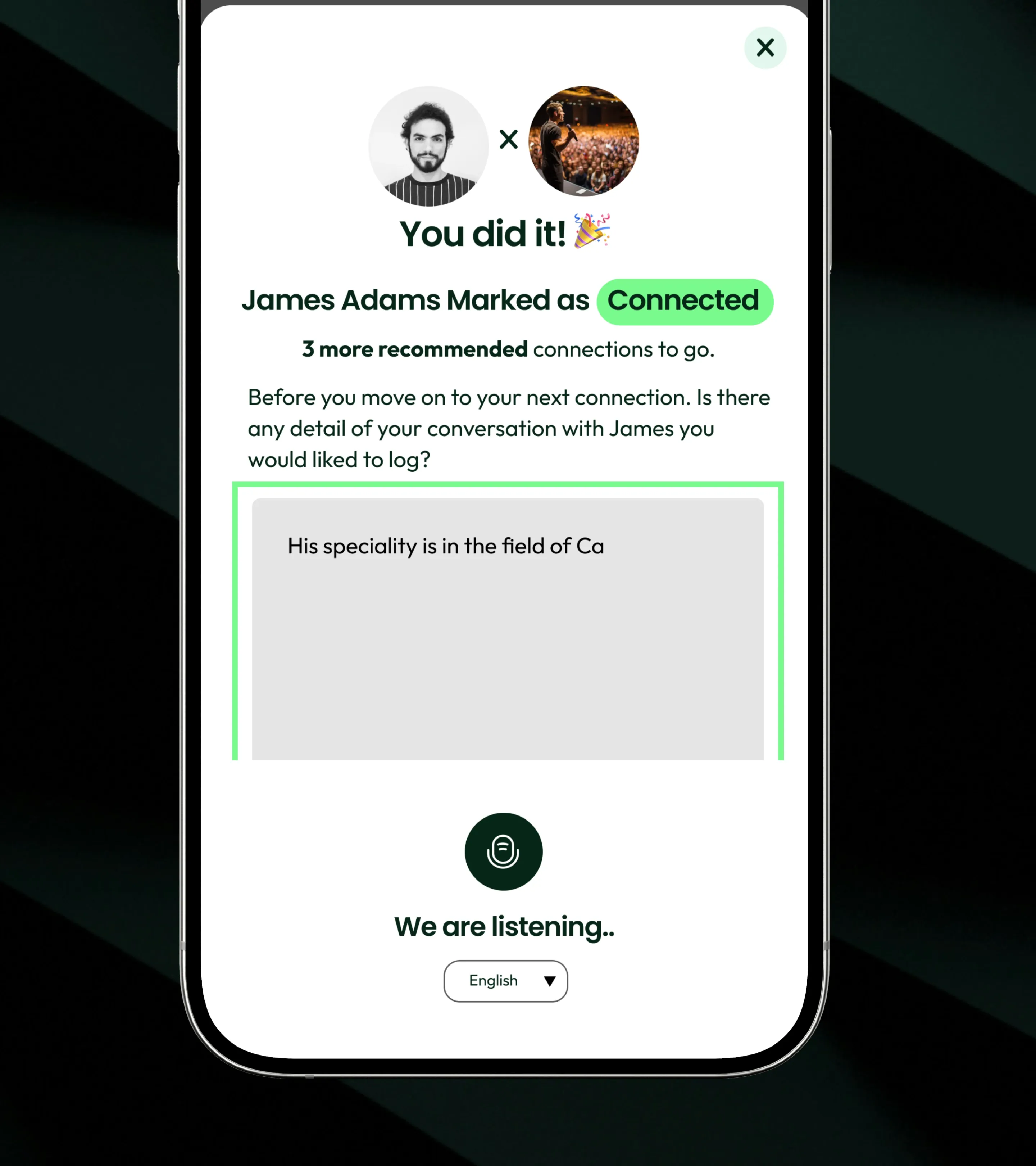
Accessible voice notes for every connection
Screen reader support and speech‑to‑text input make networking more inclusive by enabling people with visual, motor, cognitive, or language-related disabilities to participate equally in conversations and follow‑ups.
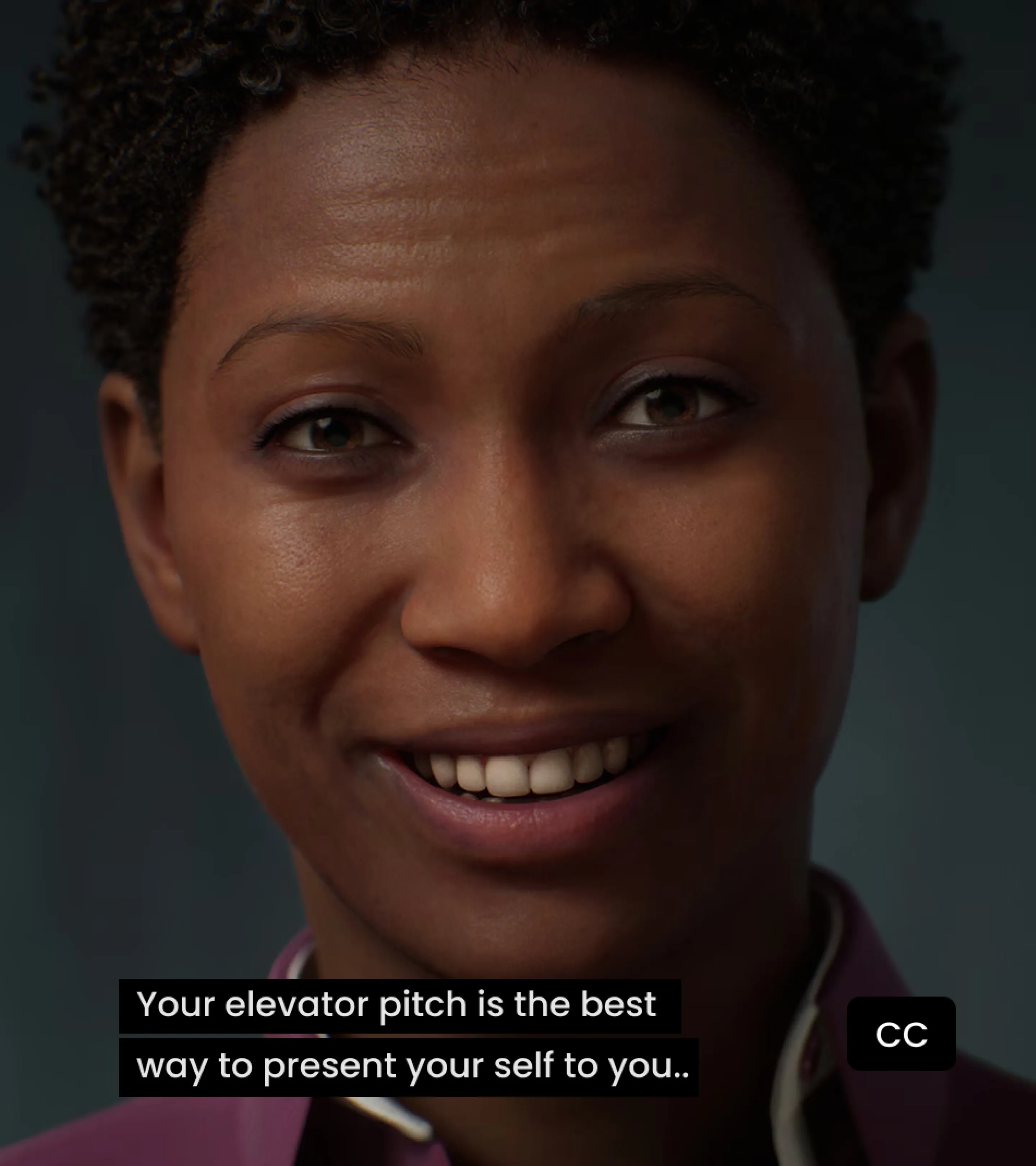
Captions that make every conversation accessible
Real-time captions ensure that spoken insights are always accessible, empowering people who are deaf, hard of hearing, or in noisy environments to fully engage in networking conversations.
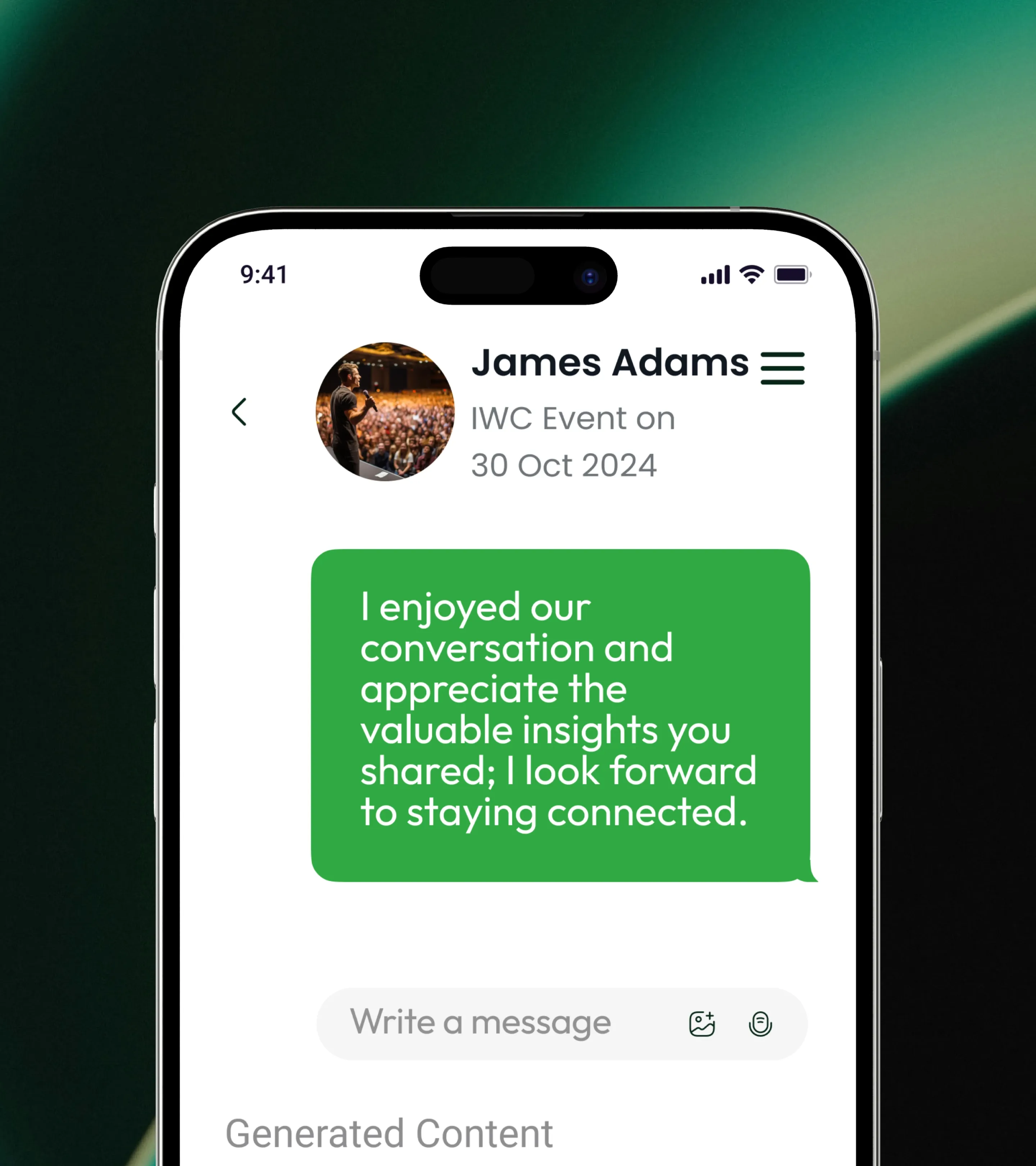
Larger fonts for better accessibility
Increased font sizes and clear typography make messages easier to read and reduce eye strain, helping users with low vision or reading difficulties stay fully engaged in every conversation.
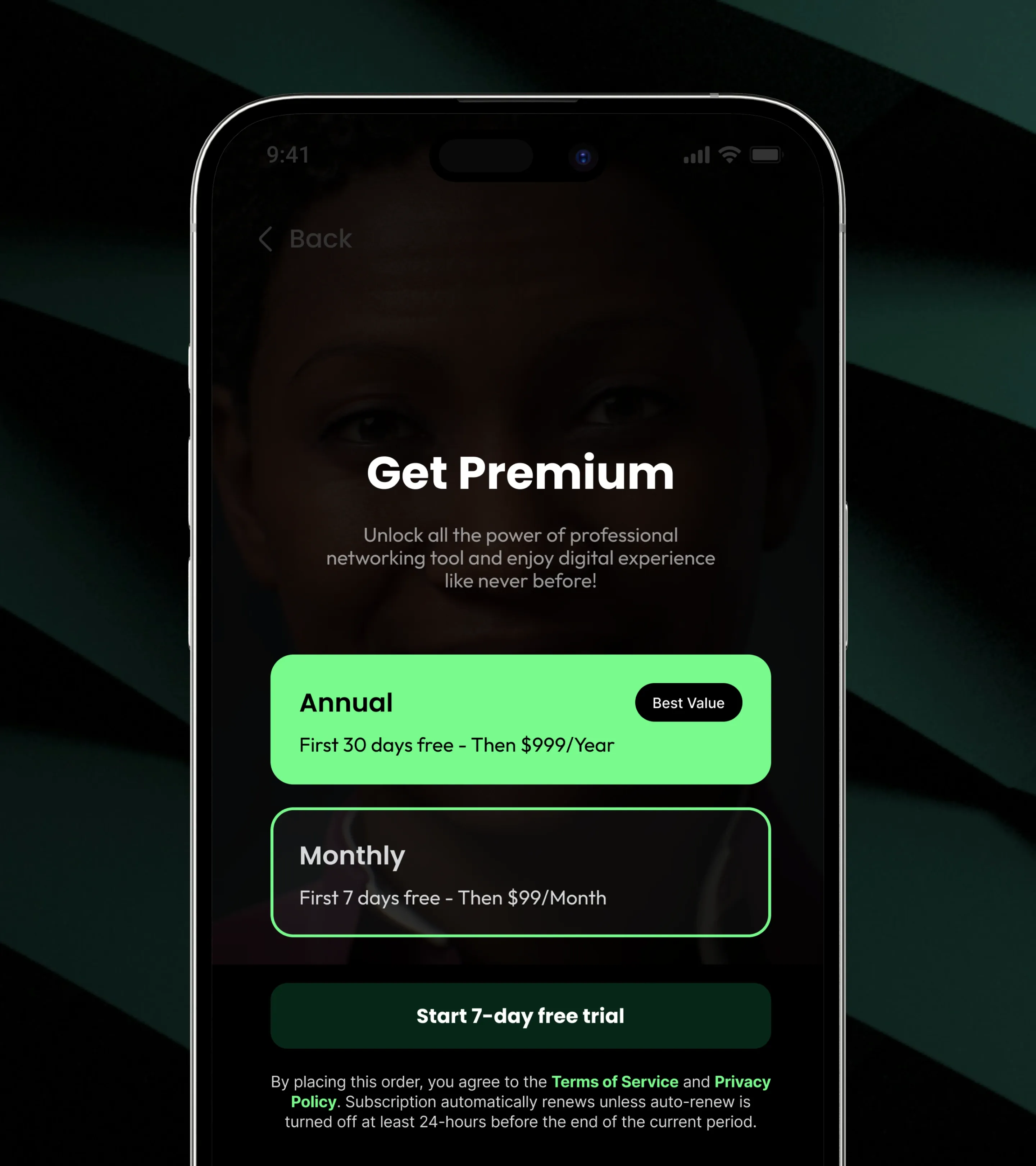
Flexible plans with a risk‑free start
Users can choose between monthly and annual freemium tiers, with a free trial that lets them experience the full value of the product before committing to a paid plan.
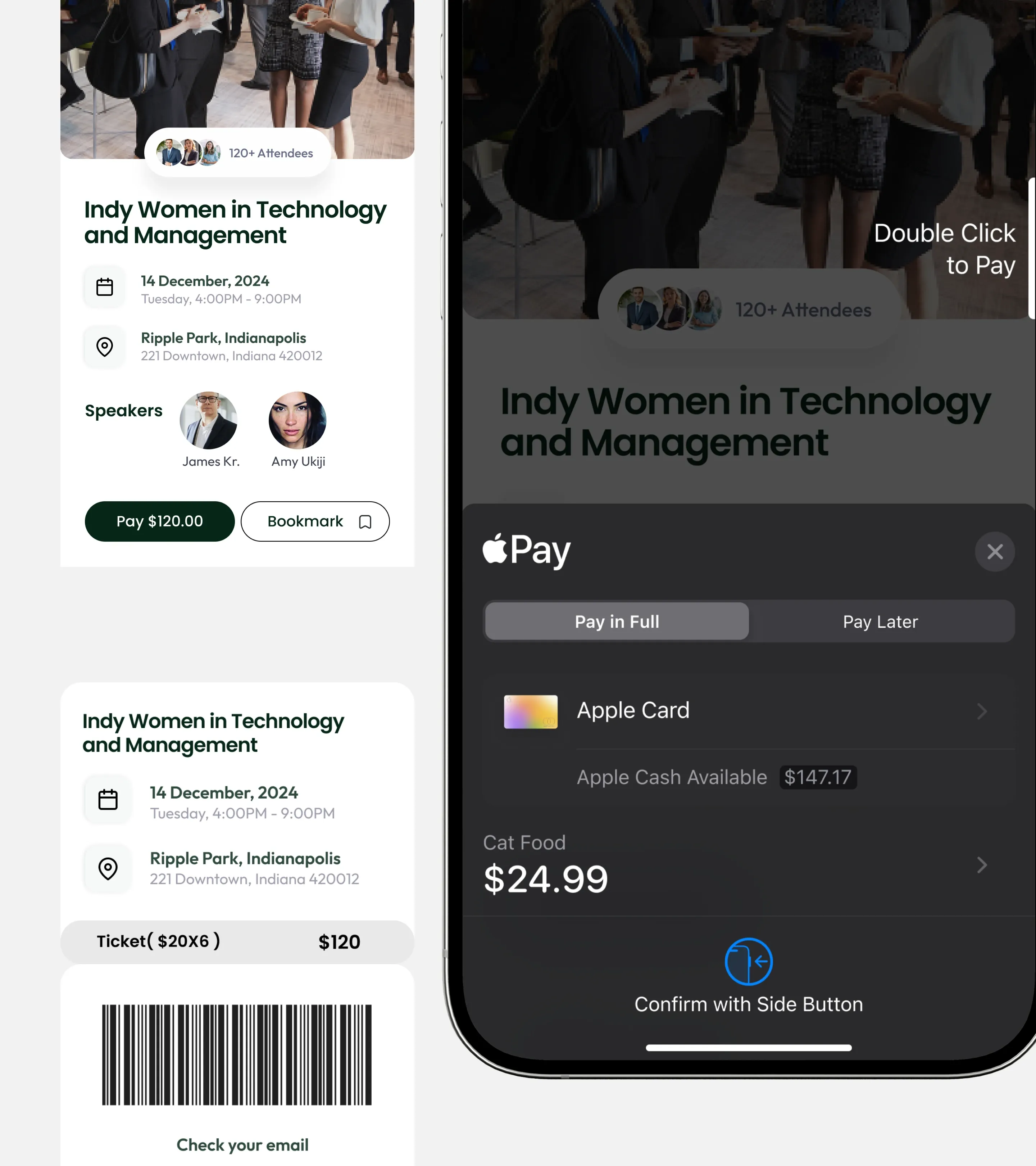
Integrating payment modes for paid events
Paid events can be built into the platform, so attendees can register and purchase tickets in one seamless flow using Apple Pay and credit cards, reducing checkout friction.
Accessible voice notes for every connection
Screen reader support and speech‑to‑text input make networking more inclusive by enabling people with visual, motor, cognitive, or language-related disabilities to participate equally in conversations and follow‑ups.
Captions that make every conversation accessible
Real-time captions ensure that spoken insights are always accessible, empowering people who are deaf, hard of hearing, or in noisy environments to fully engage in networking conversations.
Larger fonts for better accessibility
Increased font sizes and clear typography make messages easier to read and reduce eye strain, helping users with low vision or reading difficulties stay fully engaged in every conversation.
Flexible plans with a risk‑free start
Users can choose between monthly and annual freemium tiers, with a free trial that lets them experience the full value of the product before committing to a paid plan.
Integrating payment modes for paid events
Paid events can be built into the platform, so attendees can register and purchase tickets in one seamless flow using Apple Pay and credit cards, reducing checkout friction.
Accessible voice notes for every connection
Screen reader support and speech‑to‑text input make networking more inclusive by enabling people with visual, motor, cognitive, or language-related disabilities to participate equally in conversations and follow‑ups.
Captions that make every conversation accessible
Real-time captions ensure that spoken insights are always accessible, empowering people who are deaf, hard of hearing, or in noisy environments to fully engage in networking conversations.
Larger fonts for better accessibility
Increased font sizes and clear typography make messages easier to read and reduce eye strain, helping users with low vision or reading difficulties stay fully engaged in every conversation.
Flexible plans with a risk‑free start
Users can choose between monthly and annual freemium tiers, with a free trial that lets them experience the full value of the product before committing to a paid plan.
Integrating payment modes for paid events
Paid events can be built into the platform, so attendees can register and purchase tickets in one seamless flow using Apple Pay and credit cards, reducing checkout friction.
Lessons Learnt
Lessons Learnt
Lessons Learnt
Netwise started as a way to ease networking anxiety, but it ultimately taught me how much impact comes from solving specific, human problems with focused, iterative design. This project stretched my craft, my collaboration skills, and my understanding of what “real-world ready” actually means.
Netwise started as a way to ease networking anxiety, but it ultimately taught me how much impact comes from solving specific, human problems with focused, iterative design. This project stretched my craft, my collaboration skills, and my understanding of what “real-world ready” actually means.
Digging into interviews and experience maps reminded me that “networking” is not the problem; knowing what to say, when, and how is, so every solution had to target those exact friction points instead of staying generic. Turning passive learning into active practice showed how powerful repetition, feedback, and realistic scenarios can be when they are baked into the product, not bolted on at the end. I also learned that human-like timing is non negotiable for AI; even small delays can quietly erode trust and make otherwise strong interactions feel uncanny. Most importantly, testing mid fidelity and iterating often proved that good UX is less about getting it “right” the first time and more about listening, adjusting, and continually refining until the product genuinely supports people in the moments that matter.



© 2026 ankushak
Let’s talk.
No lengthy forms, no gatekeeping!
Just a straightforward conversation about what you're building and how I can help.

Let’s talk.
No lengthy forms, no gatekeeping!
Just a straightforward conversation about what you're building and how I can help.
© 2026 ankushak
Let’s talk.
No lengthy forms, no gatekeeping!
Just a straightforward conversation about what you're building and how I can help.